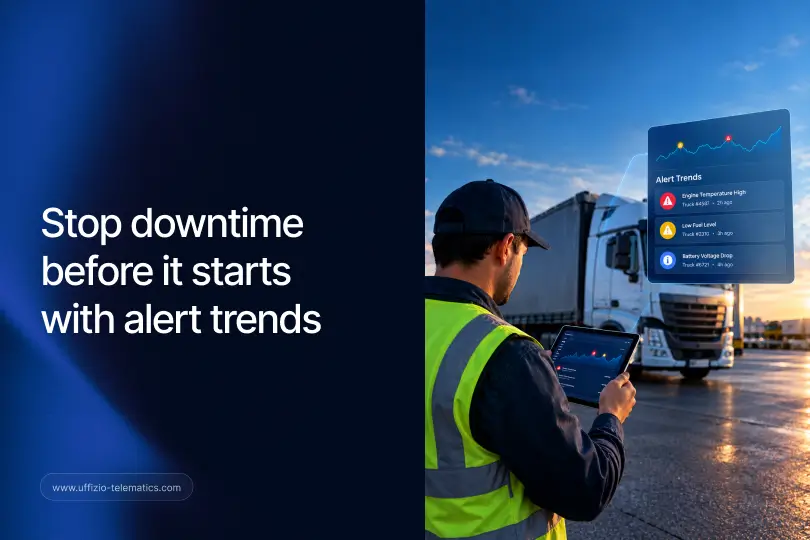
Eine Fuhrparkmanagerin erhält eine Warnmeldung. Sie prüft sie, behebt das Problem und fährt fort. Nächste Woche löst dasselbe Fahrzeug dieselbe Warnmeldung aus. Sie prüft sie erneut, behebt das Problem und fährt wieder fort.
Beim vierten Mal handelt es sich nicht mehr um einen Einzelfall, sondern um ein Muster. Doch niemand bemerkte es, da jede Warnung einzeln geprüft wurde, nie zusammen mit den anderen.
Genau diese Lücke wollte Uffizio mit der Trendanalyse von Trakzee schließen.
Das Problem beim Überprüfen von Benachrichtigungen einzeln
Die meisten Flottenmanagementsysteme behandeln jede Warnmeldung als separates Ereignis. Eine Warnmeldung wird ausgelöst, jemand prüft sie und löscht sie. Das funktioniert gut, solange dasselbe Problem nicht immer wieder auftritt.
Einzeln betrachtet wirken diese Warnmeldungen wie unzusammenhängende Störungen. Zusammengenommen ergeben sie jedoch ein ganz anderes Bild: Dieses Fahrzeug hat ein echtes Problem, keine zufällige Fehlfunktion.
Die Folgen, wenn man diese Entwicklung verpasst, sind nicht unerheblich. Ein Muster, das niemand erkennt, führt oft zu einer Panne, einer verpassten Lieferung oder einer Reparatur, die hätte geplant statt erzwungen werden können.
Was das Alarmtrenddiagramm von Trakzee tatsächlich zeigt
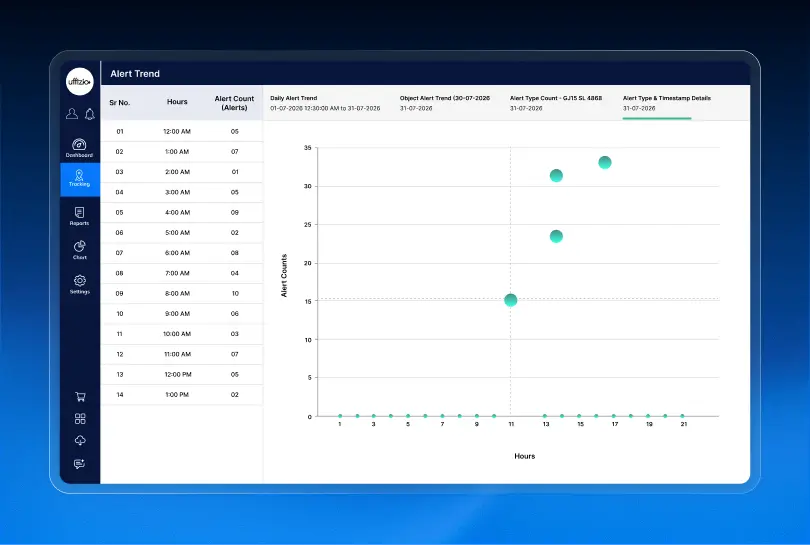
Uffizio hat diese Funktion speziell entwickelt, um verstreute Warnmeldungen in ein übersichtliches Muster umzuwandeln, das jeder auf einen Blick erkennen kann. Folgendes bietet sie einem Flottenmanager direkt in Trakzee:
- Tages-, Wochen- oder Monatsansichten — damit ein Manager den Überblick behalten und erkennen kann, ob es sich bei einer Warnung um einen einmaligen Vorfall oder einen wiederholten Verstoß handelt.
- Bis zu 10 Alarmkategorien gleichzeitig — Geschwindigkeitsübertretungen, starkes Bremsen, Leerlauf, Verstöße gegen Geofencing-Regeln und mehr, alles im direkten Vergleich.
- Detaillierte Analyse vom Trend bis ins Detail — Klicken Sie auf einen beliebigen Ausschlag im Diagramm und gelangen Sie direkt zu den einzelnen Warnmeldungen dahinter.
- PDF-Export — sodass der Trend und die Geschichte, die er erzählt, ohne zusätzlichen Aufwand gespeichert oder geteilt werden können.
Anstatt eine lange Liste einzelner Warnmeldungen durchzuscrollen, erkennt der Flottenmanager zunächst das Ausmaß des Problems und geht dann nur dort in die Tiefe, wo es wirklich darauf ankommt.
Sobald das Muster klar ist, besteht der nächste Schritt üblicherweise darin, mithilfe eines Dashboards, das die Antwort nicht versteckt, entsprechend zu handeln. Hier ist Warum anpassbare Trakzee-Dashboards dies erleichtern.
Ein einfaches Beispiel dafür, wie sich das auswirkt
Angenommen, ein Lieferwagen löst wiederholt Warnmeldungen wegen starker Bremsung aus. Eine einzelne Warnmeldung könnte wie eine normale Reaktion des Fahrers auf den Verkehr wirken. Kein Grund zur Sorge.
Schaut man sich jedoch die monatlichen Statistiken in Trakzee an, wird deutlich, dass dieser Transporter diesen Monat elfmal denselben Fehler gemeldet hat – häufiger als jedes andere Fahrzeug der Flotte. Das liegt nicht am Verkehr. Es handelt sich entweder um eine Fahrgewohnheit oder ein Bremsproblem, das überprüft werden sollte.
Ohne die Trendanalyse könnte dieses Muster monatelang unbemerkt bleiben. Mit ihr erkennt es ein Fuhrparkmanager auf einen Blick und kann handeln, bevor es zu höheren Reparaturkosten oder einem Sicherheitsvorfall führt.
Wie Sie daraus etwas machen, das Sie teilen können
Der PDF-Export ist wichtiger, als es zunächst scheint. Ein Fuhrparkmanager möchte das Muster nicht nur selbst einsehen, sondern muss es oft auch jemand anderem zeigen: einem Fahrer, einem Versicherer oder seinem eigenen Chef.
Die Möglichkeit, einen übersichtlichen Trendbericht zu exportieren, bedeutet, dass das Gespräch nicht mit „Glauben Sie mir, das passiert immer wieder“ beginnt. Es beginnt mit einem Diagramm. Das ist viel einfacher zu vermitteln und ein viel leichterer Grund für den Kunden, den Wert dessen zu erkennen, wofür er bezahlt.
Für Sie als Wiederverkäufer lohnt es sich, dies gleich zu Beginn einer Demo zu zeigen. Es beantwortet die Frage „Woher weiß ich, dass mir das tatsächlich hilft?“, noch bevor sie überhaupt gestellt wird.
Fazit
Eine einzelne Warnmeldung kann bedeutungslos erscheinen. Ein Trend hingegen nicht. Uffizios Trakzee wandelt verstreute Warnmeldungen in ein Muster um, auf das Flottenmanager tatsächlich reagieren können. Das bedeutet weniger unerwartete Ausfälle und weniger wiederkehrende Probleme, die bisher unentdeckt blieben.

Häufig gestellte Fragen
Wie weit zurück reichen die Alarmtrends von Trakzee?
Die Alarmtrends können täglich, wöchentlich oder monatlich angezeigt werden, sodass ein Flottenmanager sowohl aktuelle Spitzenwerte als auch längerfristige Muster überprüfen kann.
Wie viele Alarmtypen können gleichzeitig verglichen werden?
Bis zu 10 Alarmkategorien können ausgewählt und im selben Trenddiagramm nebeneinander verglichen werden.
Kann ich die einzelnen Warnmeldungen hinter einem Trendanstieg einsehen?
Ja. Durch Anklicken eines beliebigen Punktes im Trenddiagramm gelangen Sie direkt zu den einzelnen Benachrichtigungen, aus denen er sich zusammensetzt.
Können diese Berichte auch außerhalb der Plattform geteilt werden?
Ja. Alarmtrends können als PDF exportiert werden, sodass sie problemlos mit einem Fahrer, einem Kunden oder jeder anderen Person geteilt werden können, die das Muster erkennen muss.