
1.Trakzee Updates
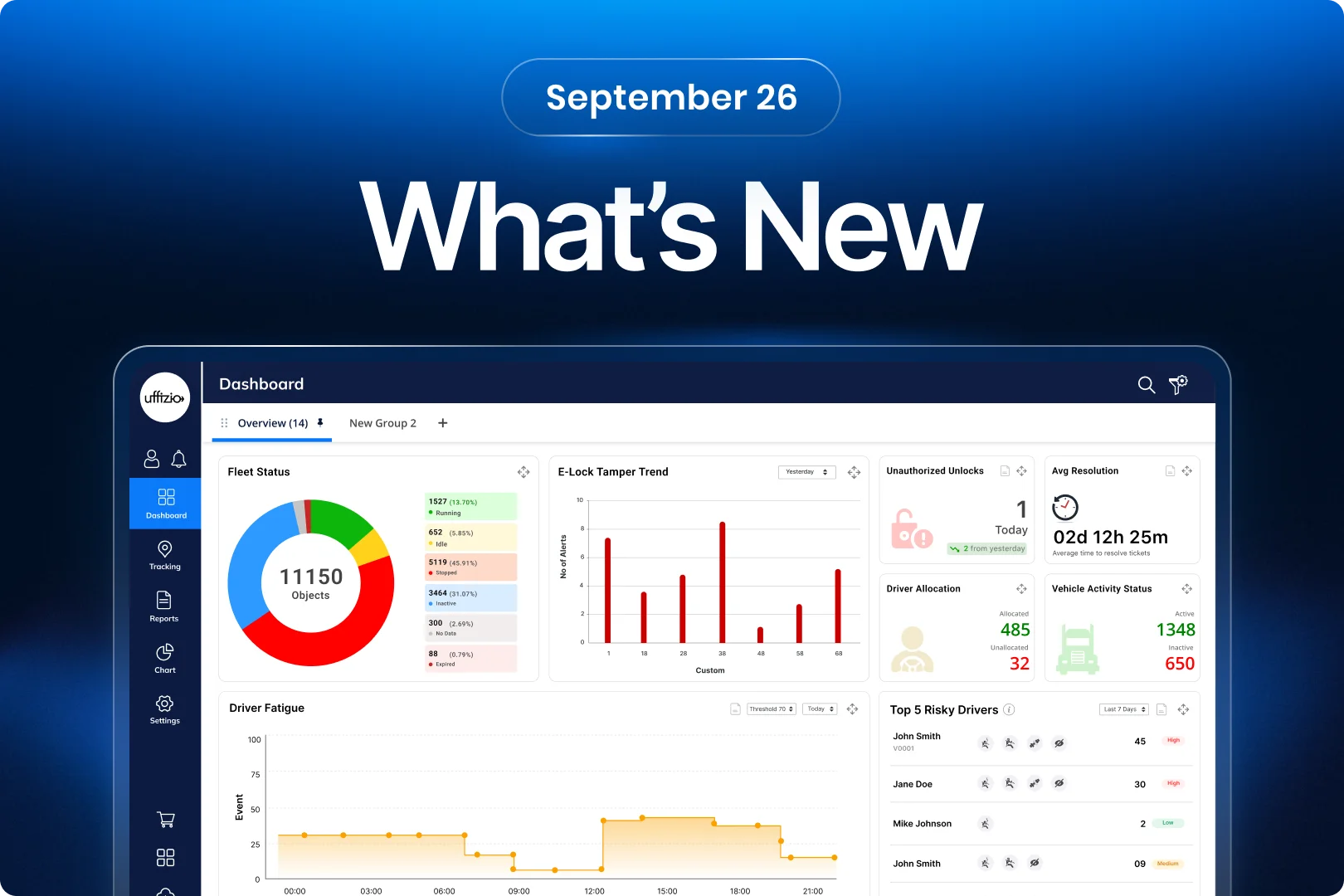
1.1 Get actionable tamper insights on your dashboard
E-Lock tamper alerts can help fleet teams identify possible security issues. But looking at individual alerts makes it difficult to understand the bigger picture. Users need a quick way to see how tamper activity changes over time.
The enhancement
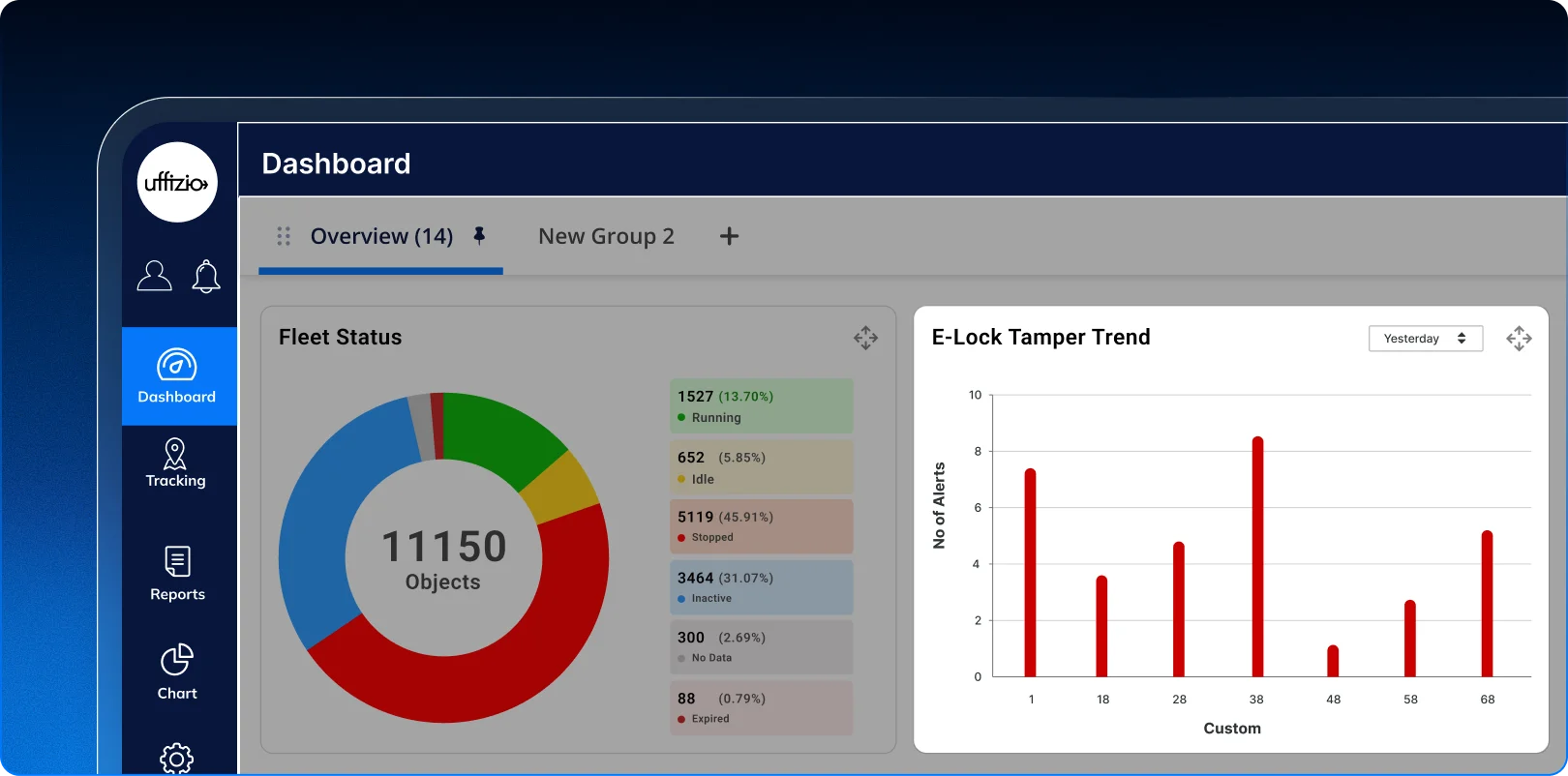
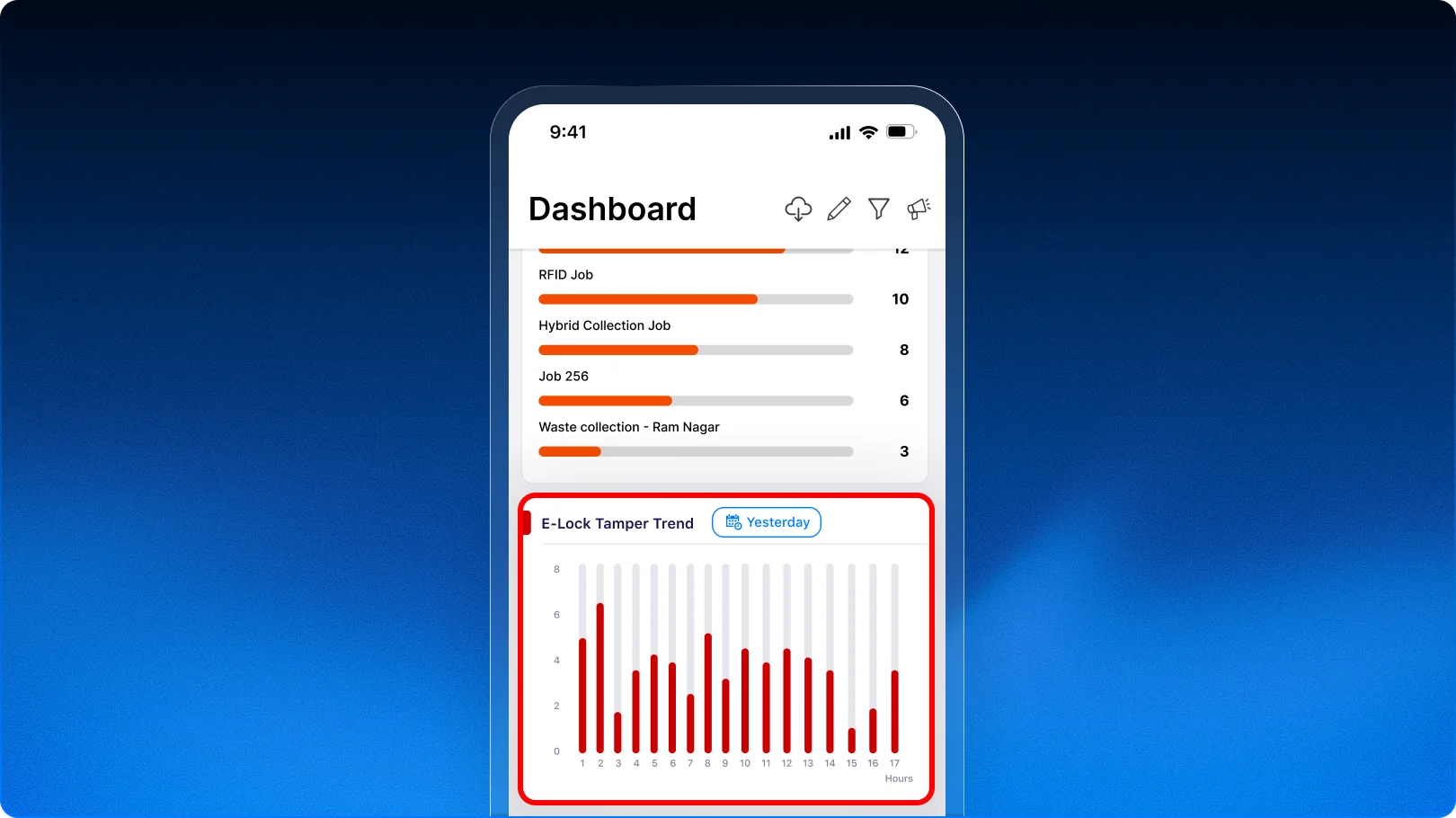
The new E-Lock Tamper Trend widget brings tamper activity directly to the Trakzee Dashboard. It gives users a clear visual view of tamper alerts over a selected period.
Users can choose from standard time periods or select a custom date range. The trend chart makes it easier to spot periods with higher or lower tamper activity. The widget also shows the total number of tamper alerts for Today, Week, and Month.
 The value
- See E-Lock tamper activity at a glance.
- Spot changes in tamper activity faster.
- Understand alert patterns over time.
- Track current tamper activity from the Dashboard.
- Reduce the need to check detailed alert screens.
 For our partners
The new widget gives System Integrators and Resellers an added security insight to showcase to E-Lock customers. It helps demonstrate how Trakzee can turn individual security alerts into clear and useful operational insights.
This can add more value to E-Lock deployments where customers need better visibility into vehicle security events.
1.2 Get clearer visibility into unauthorized unlocks on the dashboard
Vehicle security is a key concern for fleet operators using electronic locks. An unauthorized unlock can be an important sign that needs attention.
With this enhancement, Trakzee makes unauthorized unlock activity easier to see and understand directly from the eLock Dashboard.
The challenge
Users previously had to refer to detailed eLock information to identify unauthorized unlock events.
This made it harder to get a quick view of the current security situation. It was also difficult to see whether unauthorized unlock activity was increasing or decreasing.
The enhancement
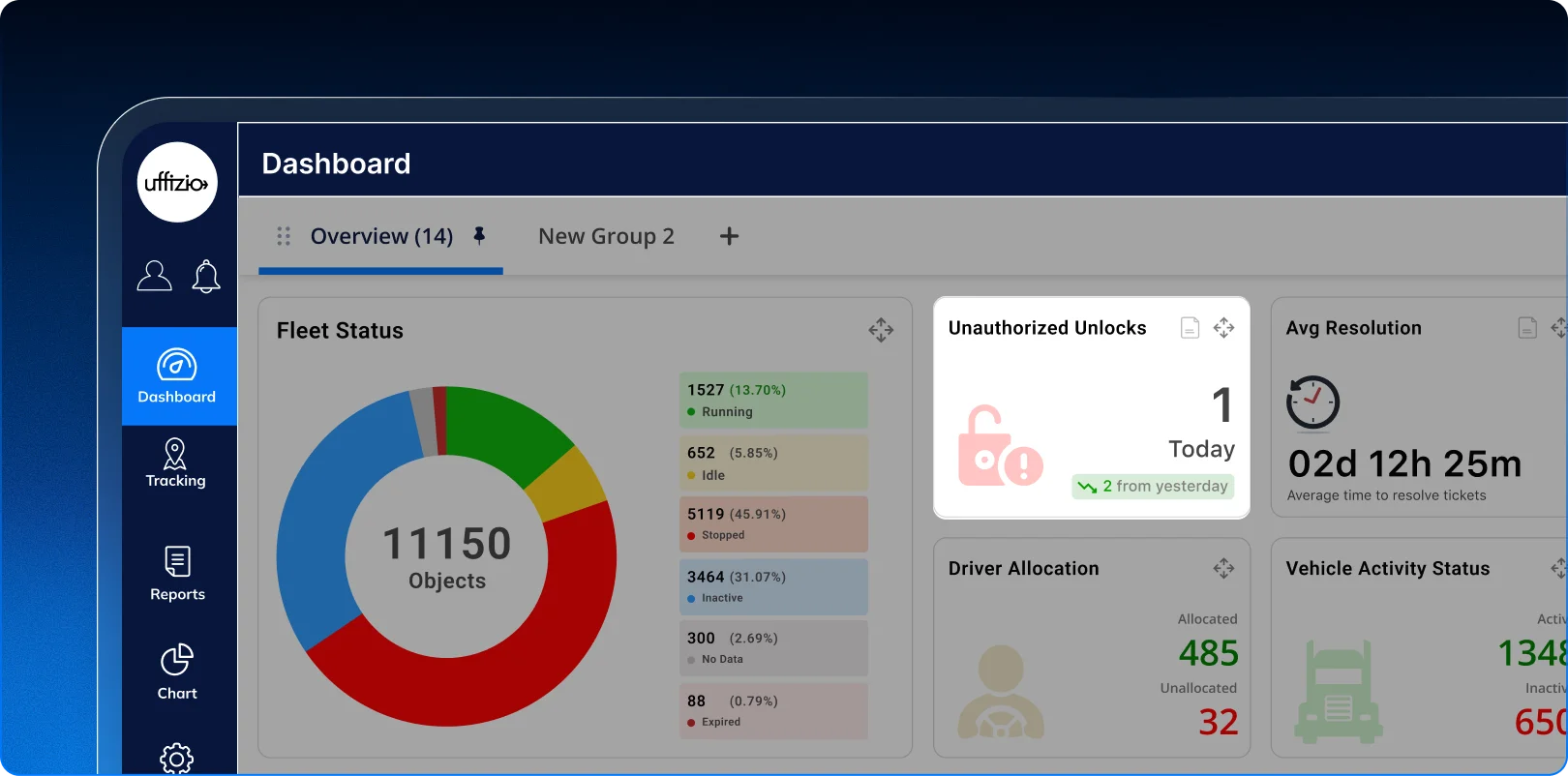
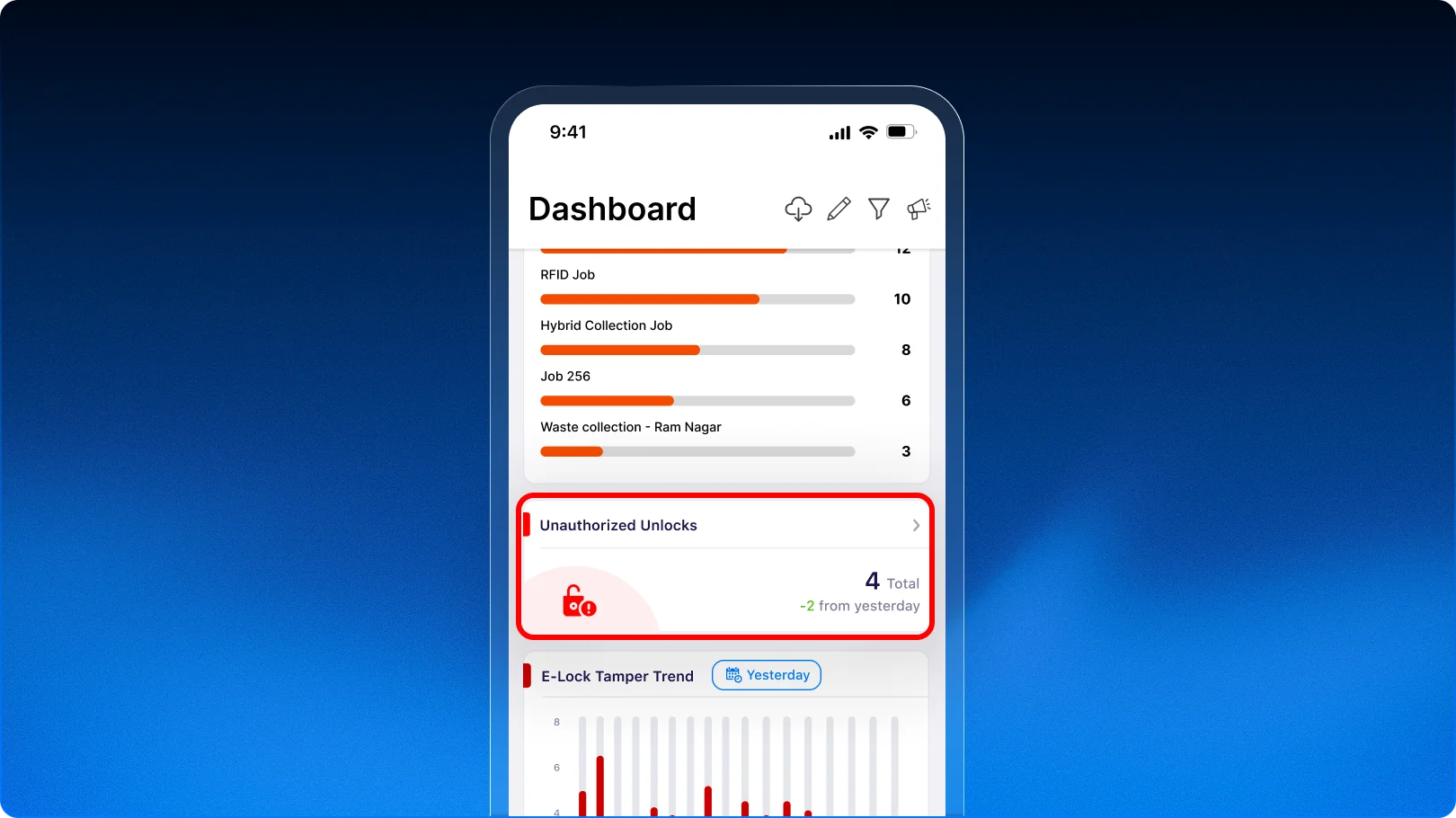
A new Unauthorized Unlocks widget is now available on the eLock Dashboard.
The widget shows the total number of unauthorized unlock events for the current day. It also compares the activity with the previous day and clearly shows whether it has increased, decreased, or remained the same.
Users can also open a detailed view to see the branch, vehicle, date, and time linked to each unauthorized unlock event. The details can also be exported in PDF or XLS format.
 The value
- Get a quick view of unauthorized unlock activity.
- Spot an increase in security events faster.
- Compare current activity with the previous day.
- Identify the vehicle and branch linked to an event.
- Review and export event details when needed.
 For our partners
This gives System Integrators and Resellers another security-focused capability to showcase to customers using eLocks.
It can add more value to fleet security solutions by giving customers a simple way to monitor and understand unauthorized access activity.
1.3 Know when a vehicle moves with its E-Lock unsecured
Keeping an E-Lock secured while a vehicle is in operation is important for protecting cargo and maintaining operational security. But without a dedicated alert, users may not know when a vehicle starts moving while its E-Lock is still unlocked.
What’s added
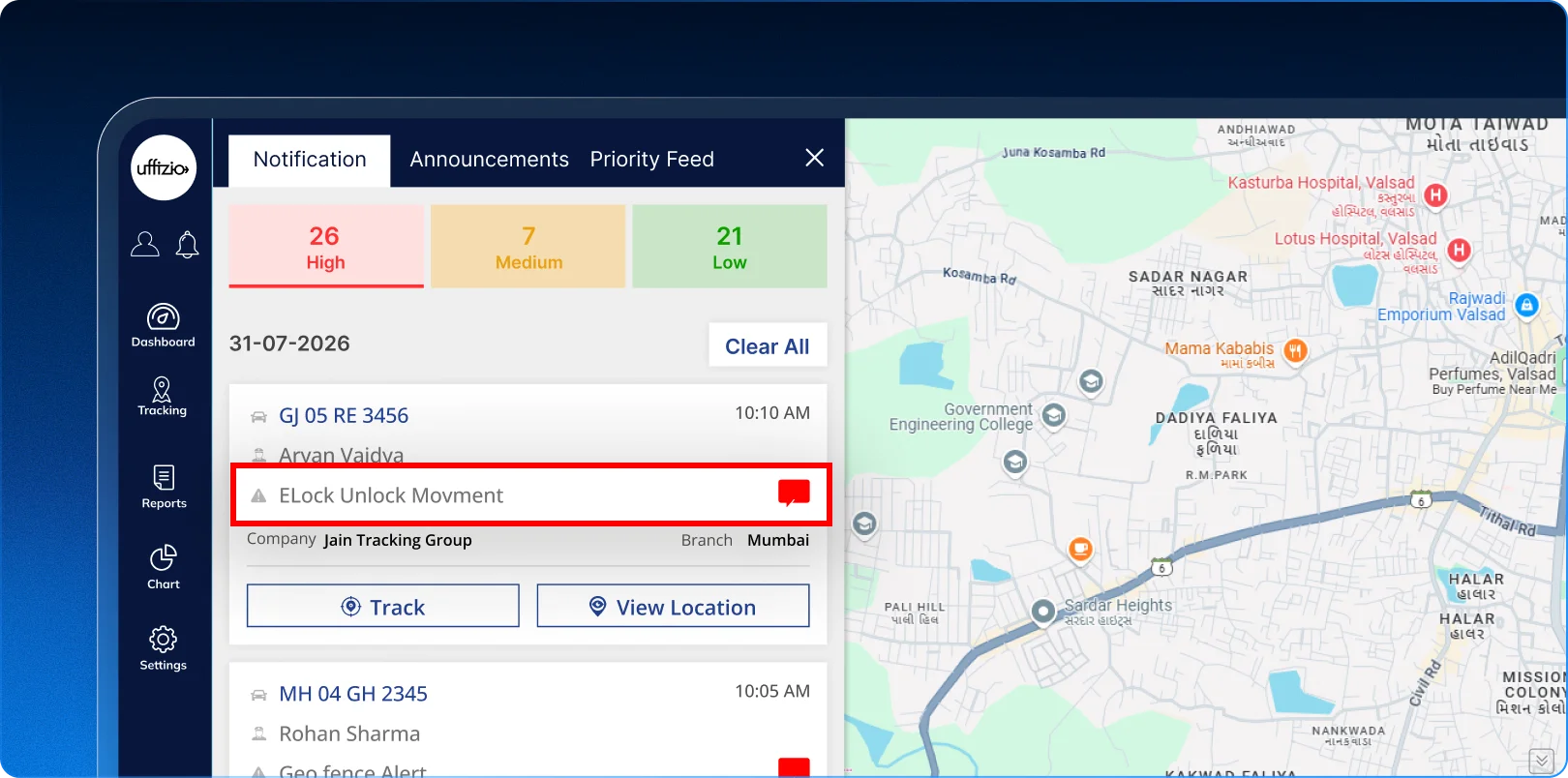
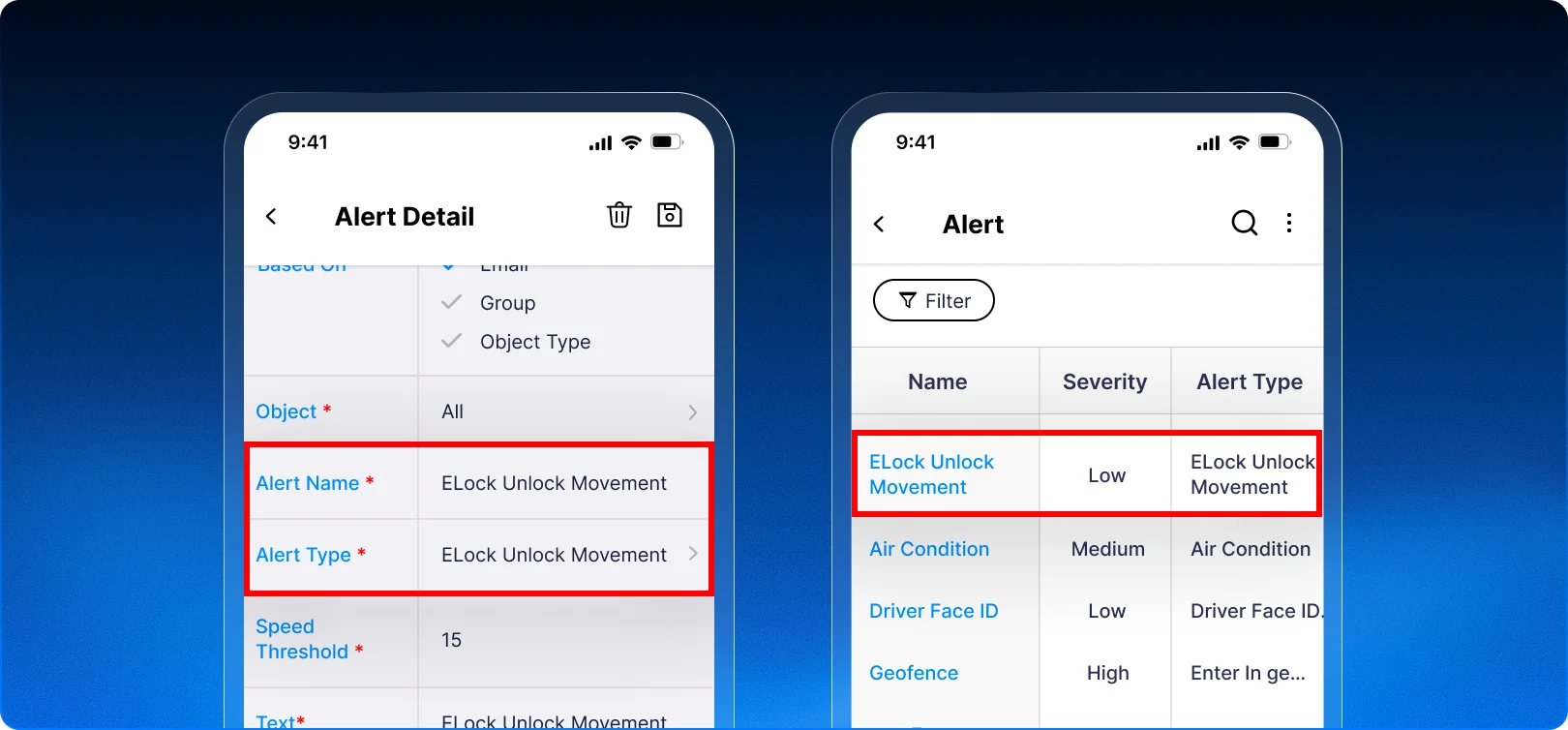
A new Elock Unlock Movement alert is now available in Trakzee.
The alert can be configured with a speed threshold. When a vehicle moves above the configured speed while its E-Lock is unlocked, the system can generate an alert.
Users can also continue using the existing alert options, including alert messages, severity, valid days and times, and notification actions.
What problem does this enhancement solve?
Previously, users could miss situations where a vehicle was moving while its E-Lock remained unlocked.
This could create a security or operational concern. The new alert helps bring such situations to attention as they happen.
 How does this benefit you?
- Get notified about potentially risky E-Lock movement.
- Identify unsecured vehicle movement faster.
- Add another layer of vehicle security.
- Set a speed threshold based on your operational needs.
- Use existing notification options to reach the right people.
- Respond faster when an E-Lock remains unsecured.
 How does this help our partners?
This gives System Integrators and Resellers another security-focused feature to offer with E-Lock solutions.
It can help you demonstrate a more proactive approach to vehicle security, especially for customers transporting valuable cargo or sensitive goods.
1.4 Share live vehicle locations with a simple QR code
Sharing a vehicle’s live location is useful when customers, teams, or other stakeholders need to track a vehicle in real time. But sometimes, sending or copying a link may not be the most convenient option.
Trakzee now gives users another simple way to share a live vehicle location using a QR code.
What’s added
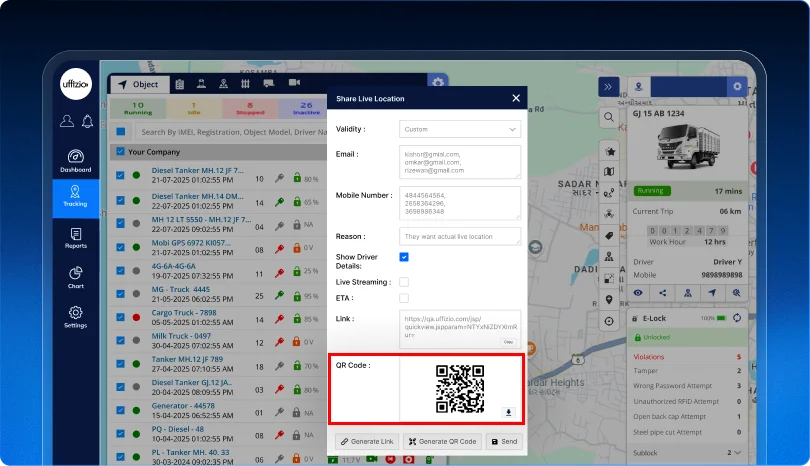
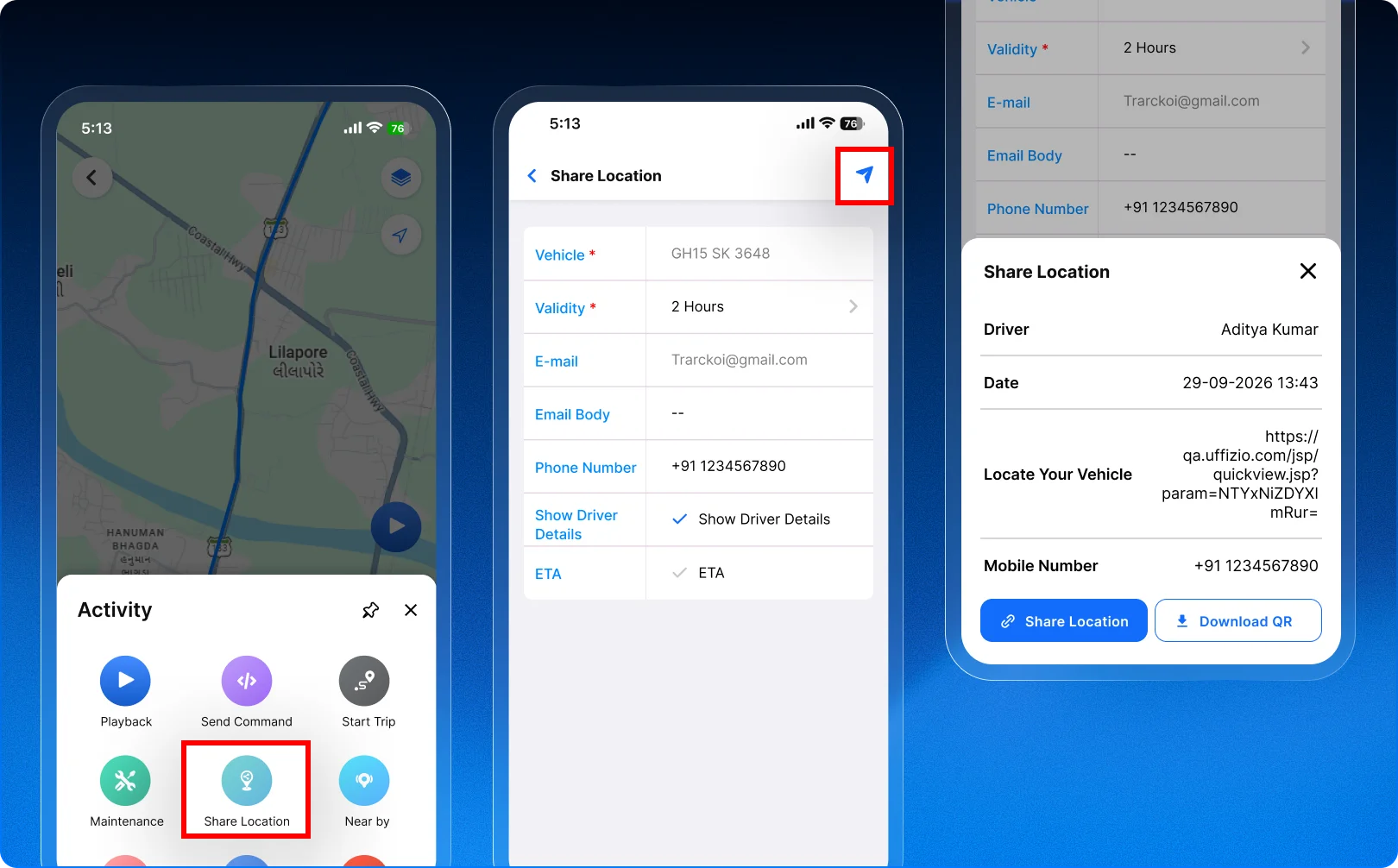
The existing Share Location feature now includes a Generate QR Code option.
Users can generate a QR code using the same live-location link already created by Trakzee. The QR code can be viewed and downloaded for sharing.
The enhancement is also available in the mobile application. Users can choose between Share Link and Download QR Code when sharing a vehicle’s location.
The existing link, SMS, and email sharing options continue to work as before. QR codes are available for download and are not sent through SMS or email.
What problem does this enhancement solve?
Sharing a live location may not always be convenient through a link alone.
Users may want to display or share the location in a different format. The QR code provides an easy alternative while using the same live-location access already available in Trakzee.
 How does this benefit you?
- Share live vehicle locations in another convenient format.
- Generate a QR code directly from Share Location.
- Download the QR code and share it as needed.
- Give recipients an easy way to access the live location.
- Continue using the existing link, SMS, and email options.
- Use the same validity rules as the existing shared location.
 How does this help our partners?
This gives System Integrators and Resellers another customer-friendly sharing option to demonstrate.
It can be useful for customers who regularly share vehicle locations with visitors, customers, field teams, or other stakeholders. It also adds more flexibility to the overall live-tracking experience.
1.5 Get a clearer view of your fleet status on live tracking screen
Knowing the actual status of every vehicle is important for day-to-day fleet operations. But when expired vehicles are included in the no data count, it can make the fleet status harder to understand.
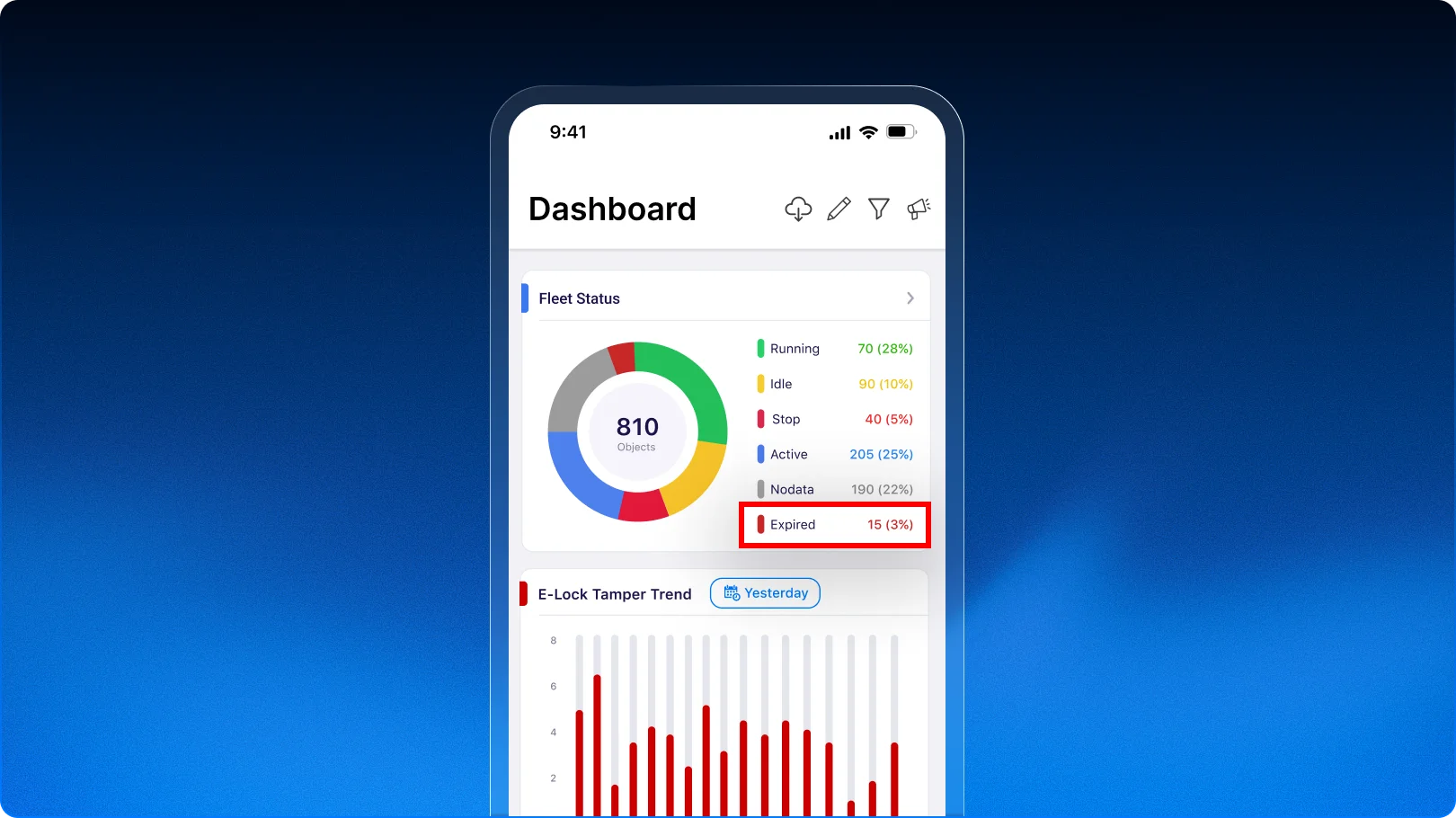
Trakzee now separates expired vehicles from vehicles that are active but simply not sending data. This gives users a more accurate view of their fleet status.
What’s updated
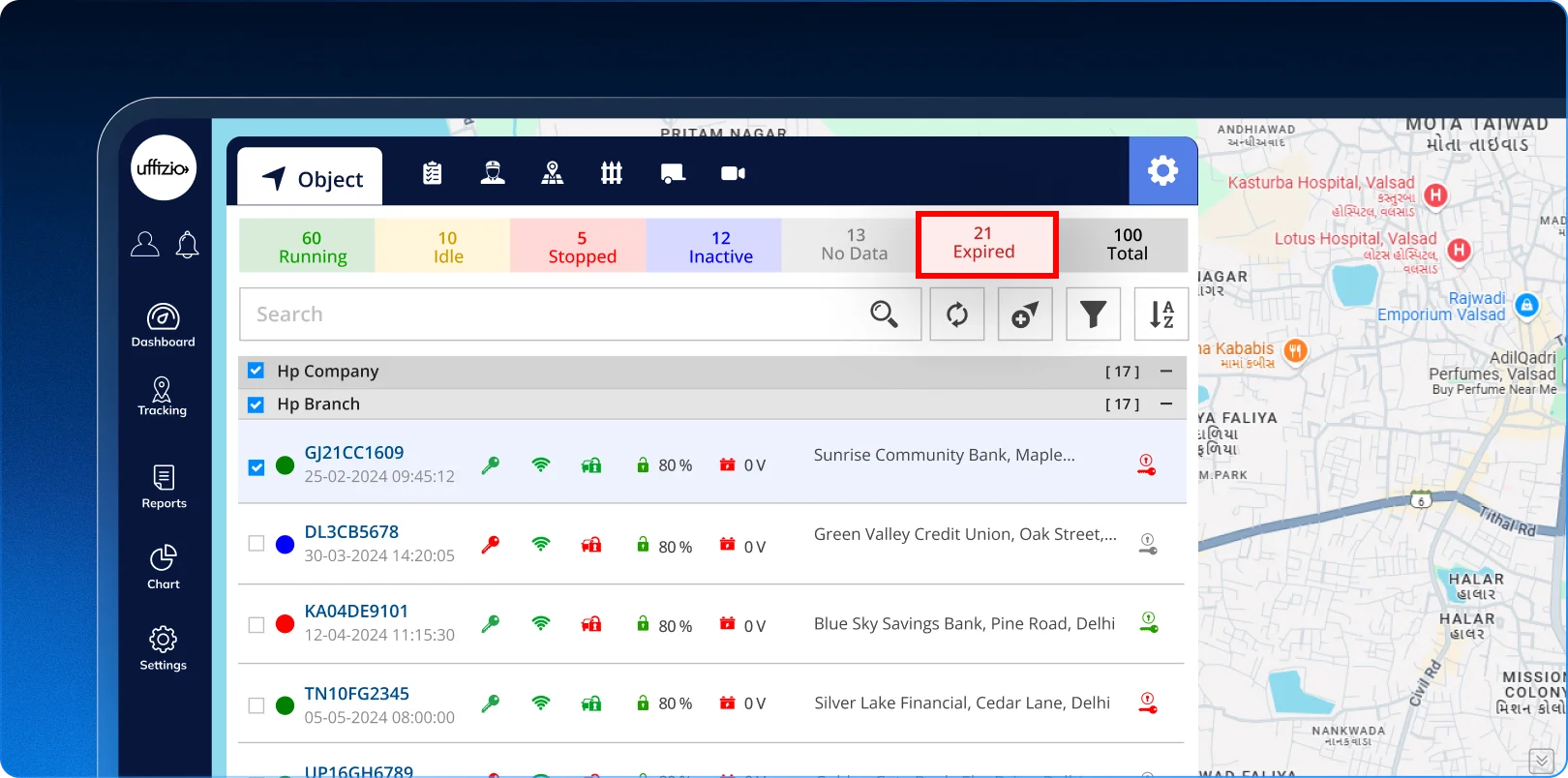
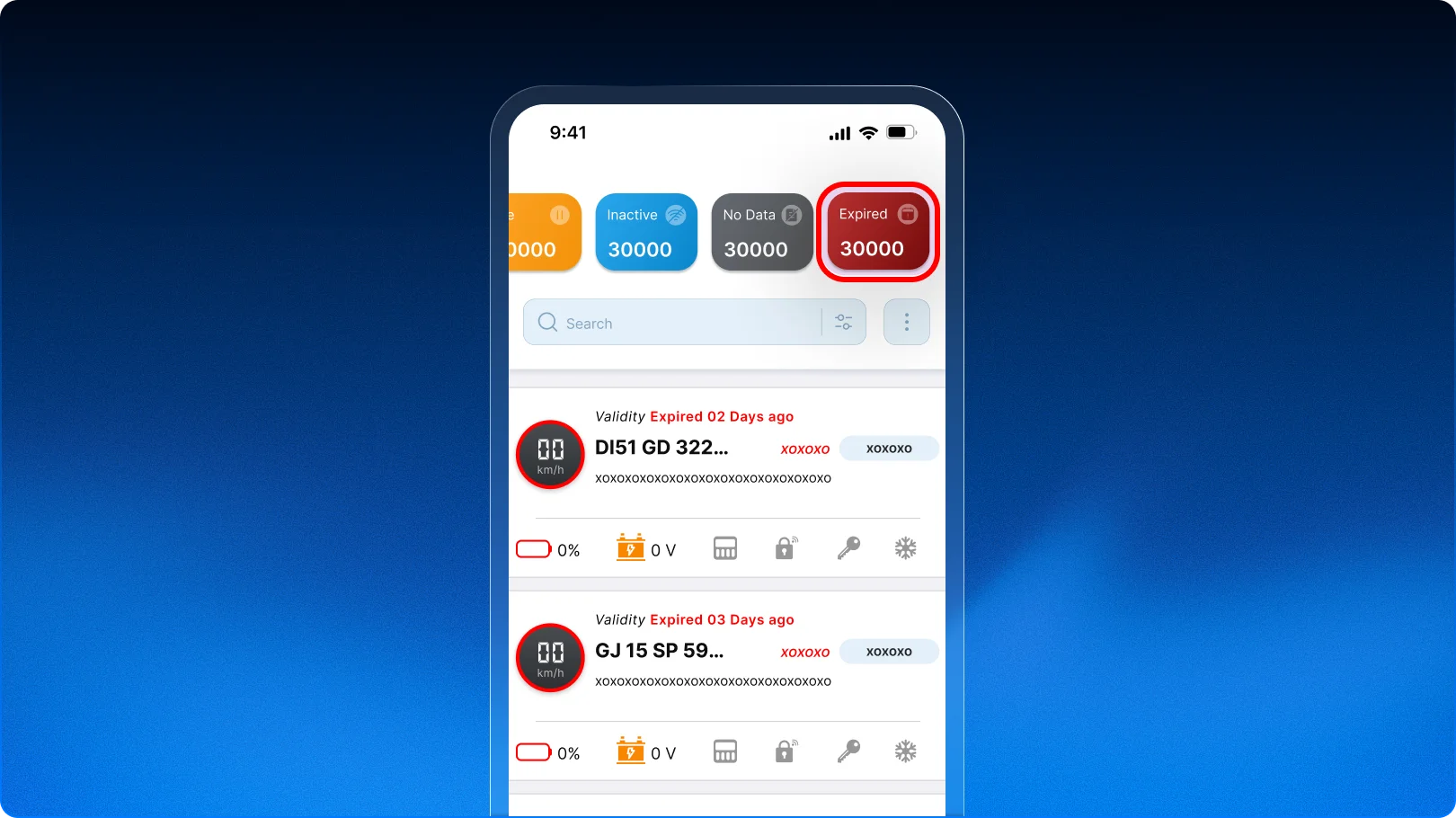
A new expired tab is now available in live tracking.
Expired vehicles are shown separately under this tab. The no data section now shows only active vehicles that are not sending data.
The expired tab appears only when there are expired vehicles in the account. The same experience is available on both web and mobile.
The updated view also provides separate and accurate counts for no data and expired vehicles.
 What problem does this enhancement solve?
Previously, expired vehicles were included in the no data count.
This could make the count misleading and create confusion about which vehicles actually have a data issue. The new separation makes each status easier to understand.
 How does this benefit you?
- Get a more accurate view of fleet status.
- Quickly identify expired vehicles.
- Know which vehicles are actually not sending data.
- Avoid confusion caused by mixed status counts.
- Monitor vehicle status more easily from Live Tracking.
- Get the same clear view on Web and Mobile.
 How does this help our partners?
This gives system integrators and resellers a clearer fleet monitoring experience to offer their customers.
It also makes the platform easier to understand during customer demonstrations, especially for fleets with a large number of vehicles and different vehicle statuses.
1.6 Reduce manual work with automatic odometer updates
Keeping vehicle odometer values updated is important for accurate distance tracking and vehicle management. But manually entering these values can take time and may lead to incorrect data.
This enhancement makes the process simpler by automatically using the odometer value received from the tracking device.
What’s updated
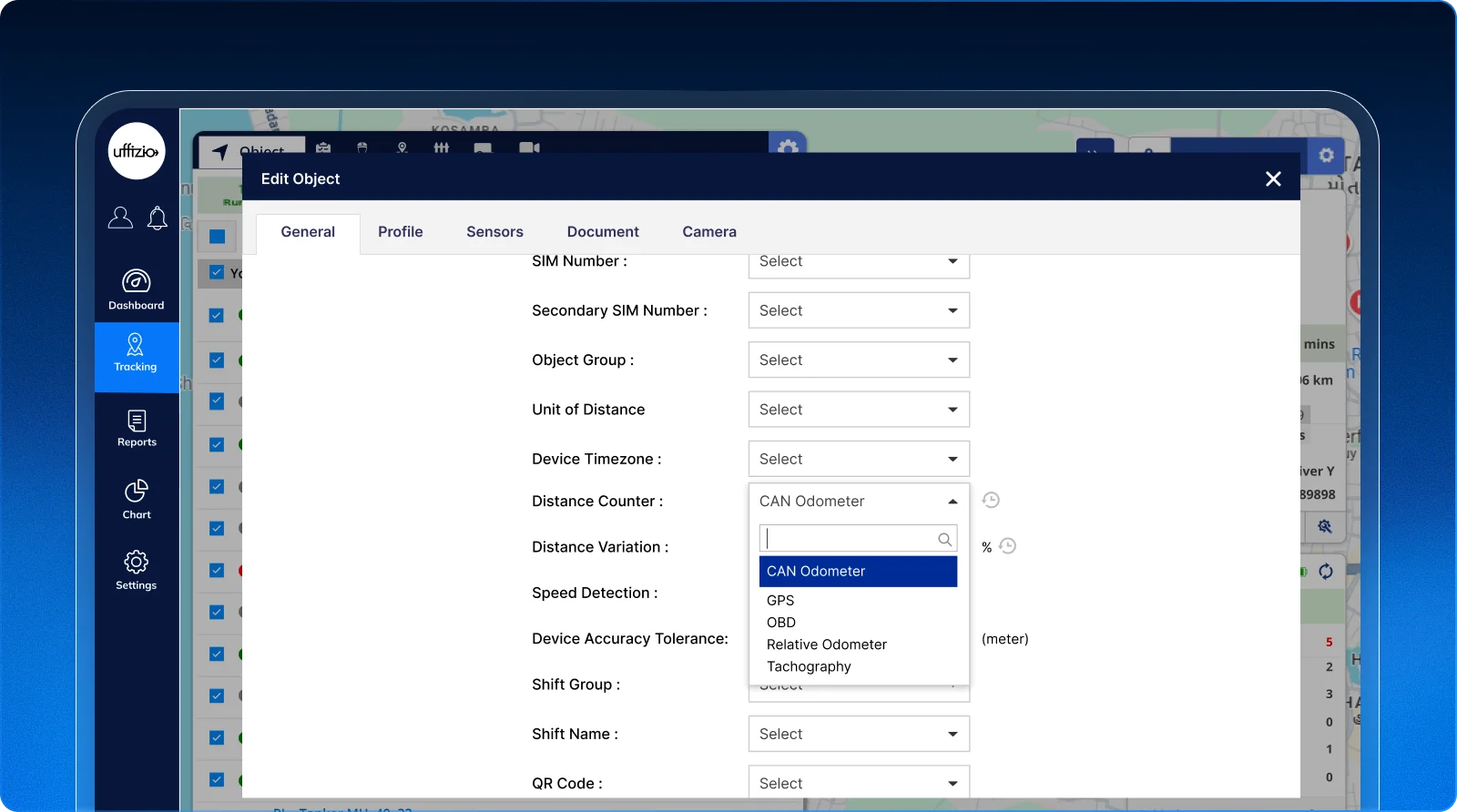
The vehicle profile can now use the odometer value received from the tracking device based on the configured odometer type.
For example, if a vehicle is configured to use CAN Odometer, the system can use the CAN odometer value received from the device. If it is configured to use Relative Odometer, the corresponding value can be used instead.
This removes the need to manually enter the odometer value in the vehicle profile.
 What problem does this enhancement solve?
Previously, users had to open the vehicle details, select the required odometer type, and manually enter the odometer value received from the device.
This added extra work and created a possibility of incorrect or duplicate entries.
The new approach reduces these manual steps and helps keep the vehicle profile aligned with the available device data.
How does this benefit you?
- Reduce manual odometer updates.
- Save time spent maintaining vehicle data.
- Reduce the risk of incorrect entries.
- Avoid duplicate data updates.
- Keep vehicle profiles updated with device information.
- Make vehicle management more efficient.
How does this help our partners?
This gives System Integrators and Resellers a more automated vehicle management experience to offer their customers.
It can be especially useful for fleets where odometer data is regularly received from tracking devices and needs to be maintained across a large number of vehicles.
1.7 Stay ahead of device battery overcharge risks
Tracking devices rely on their internal batteries to keep fleet data flowing. When a device battery stays at a high level for too long, it can affect battery health, lifespan, and device performance.
Trakzee now adds a dedicated alert to help users identify possible overcharge conditions and take action when needed.
What’s added
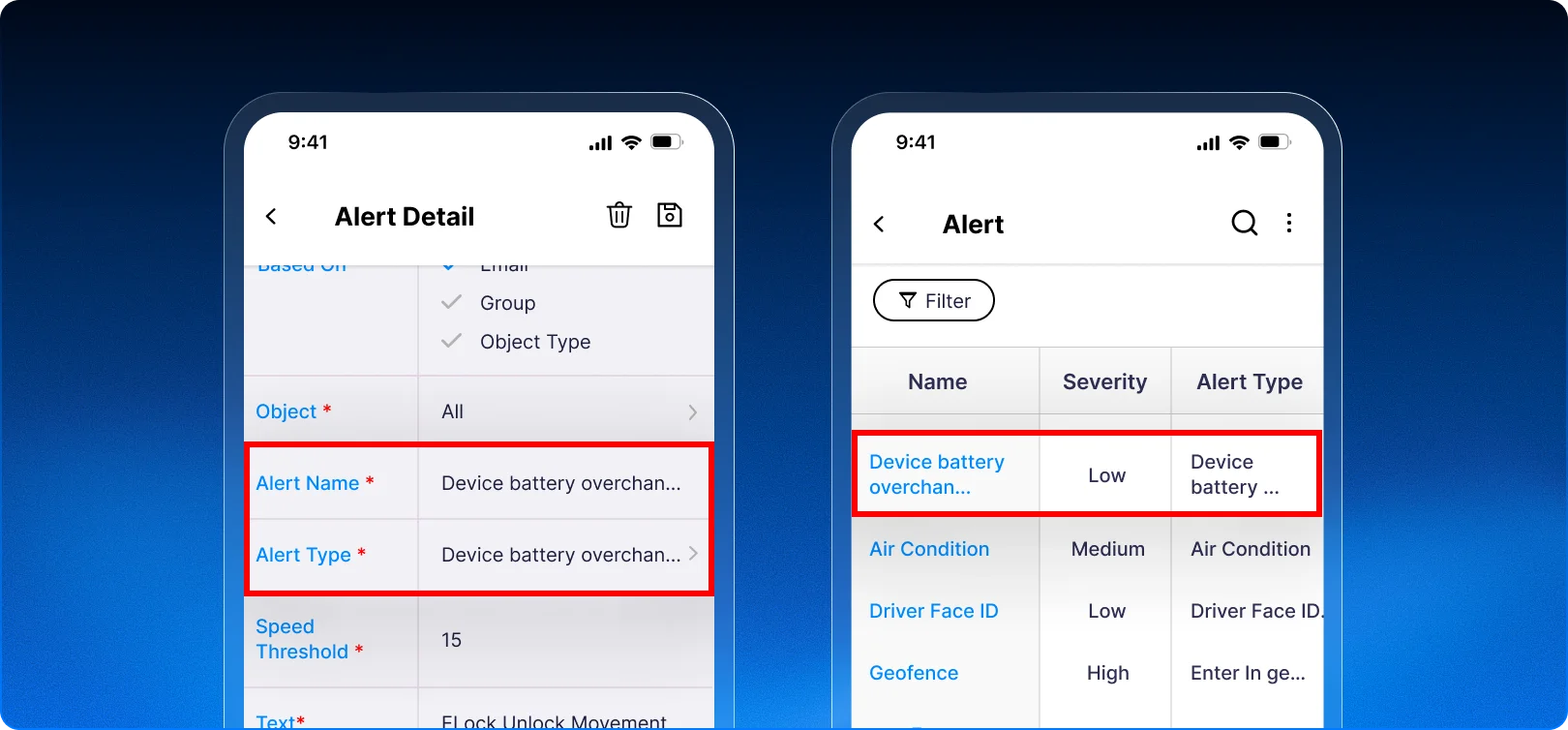
A new device battery overcharge alert is now available on both web and mobile.
Users can set a battery percentage threshold and a duration. When the device battery remains above the selected level for that duration, Trakzee generates an alert.
The alert can be viewed on the Web and Mobile applications. Users can also receive notifications based on their configured alert actions.
When the battery level drops below the selected threshold, the alert is automatically cleared.
What problem does this enhancement solve?
Previously, Trakzee could alert users when a device battery was too low. But there was no dedicated alert for unusually high battery levels.
This made it harder to identify possible overcharge conditions that could contribute to battery degradation or overheating.
 How does this benefit you?
- Get early visibility into high battery levels.
- Monitor device battery health more proactively.
- Reduce the risk of prolonged high battery conditions.
- Set thresholds based on your operational needs.
- Receive alerts on Web and Mobile.
- Take action before a battery issue affects device availability.
How does this help our partners?
This gives System Integrators and Resellers another device health and monitoring capability to offer their customers.
It can add value to fleet tracking solutions where customers want better visibility into the health and reliability of their tracking devices.
1.8 Get clearer trip insights with flexible day filters
Fleet activity can vary greatly between weekdays and weekends. But finding trips for specific days within a larger date range can take extra effort.
The Trip Summary Report now makes this easier. Users can filter trip data by specific days of the week and get a more focused view of their operations.
What’s added
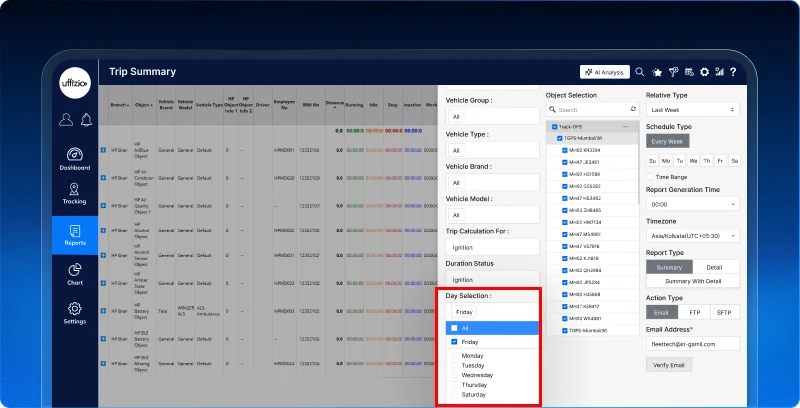
A new Day Filter is now available in the Trip Summary Report.
Users can select one or multiple days from Monday to Sunday. The day filter can be used along with existing options such as Today, Yesterday, Month, and Custom Date Range.
For example, users can select August 2026 + Saturday and Sunday to view only weekend trips from that month.
The selected day filters also apply to downloaded reports, so exported files contain only the relevant trip data.
 What problem does this enhancement solve?
Previously, users could select a date range but could not directly filter the report by specific days of the week.
To study patterns such as weekend trips, they had to download the full report and filter the data manually in a spreadsheet.
The new filter removes this extra step and lets users get the required data directly from the report.
How does this benefit you?
- Analyze weekday and weekend trips easily.
- Focus on the specific days that matter.
- Reduce manual spreadsheet work.
- Get more focused trip reports.
- Apply multiple day filters together.
- Keep exported reports aligned with the selected days.
How does this help our partners?
This gives System Integrators and Resellers a more flexible reporting capability to offer their customers.
It can be especially useful for customers who manage different operating schedules across weekdays, weekends, or specific working days.
1.9 Bringing Asaas payment support to your billing workflow
Flexible payment options can make subscription and platform billing easier for businesses and their customers.
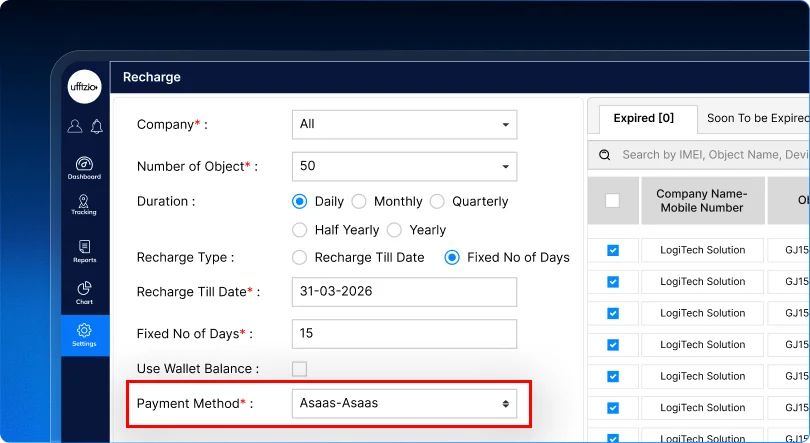
To give administrators more choice, Trakzee now supports Asaas as a payment gateway for customer billing and subscription payments.
What’s added
Asaas is now available as a new option under Payment Gateway.
Platform administrators from Brazil can use Asaas to process payments from their customers for platform usage and subscription plans.
The integration follows the existing billing workflow used by the other supported payment gateways.
What problem does this enhancement solve?
Businesses may have different payment preferences based on their market and customer needs.
Previously, customers using Asaas could not use it within the existing platform billing workflow.
The new integration gives administrators another payment option without changing the overall billing process.
 How does this benefit you?
- Get another option for processing customer payments.
- Support Asaas within the existing billing workflow.
- Make subscription payments easier to manage.
- Give customers more payment flexibility.
- Manage platform usage and subscription billing through the platform.
How does this help our partners?
This gives System Integrators and Resellers another payment option to offer their customers, especially when Asaas is part of their preferred billing setup.
It can make the platform more adaptable to different customer payment requirements and help partners support a wider range of billing needs.
1.10 Stay on top of SETU orders with timely notifications
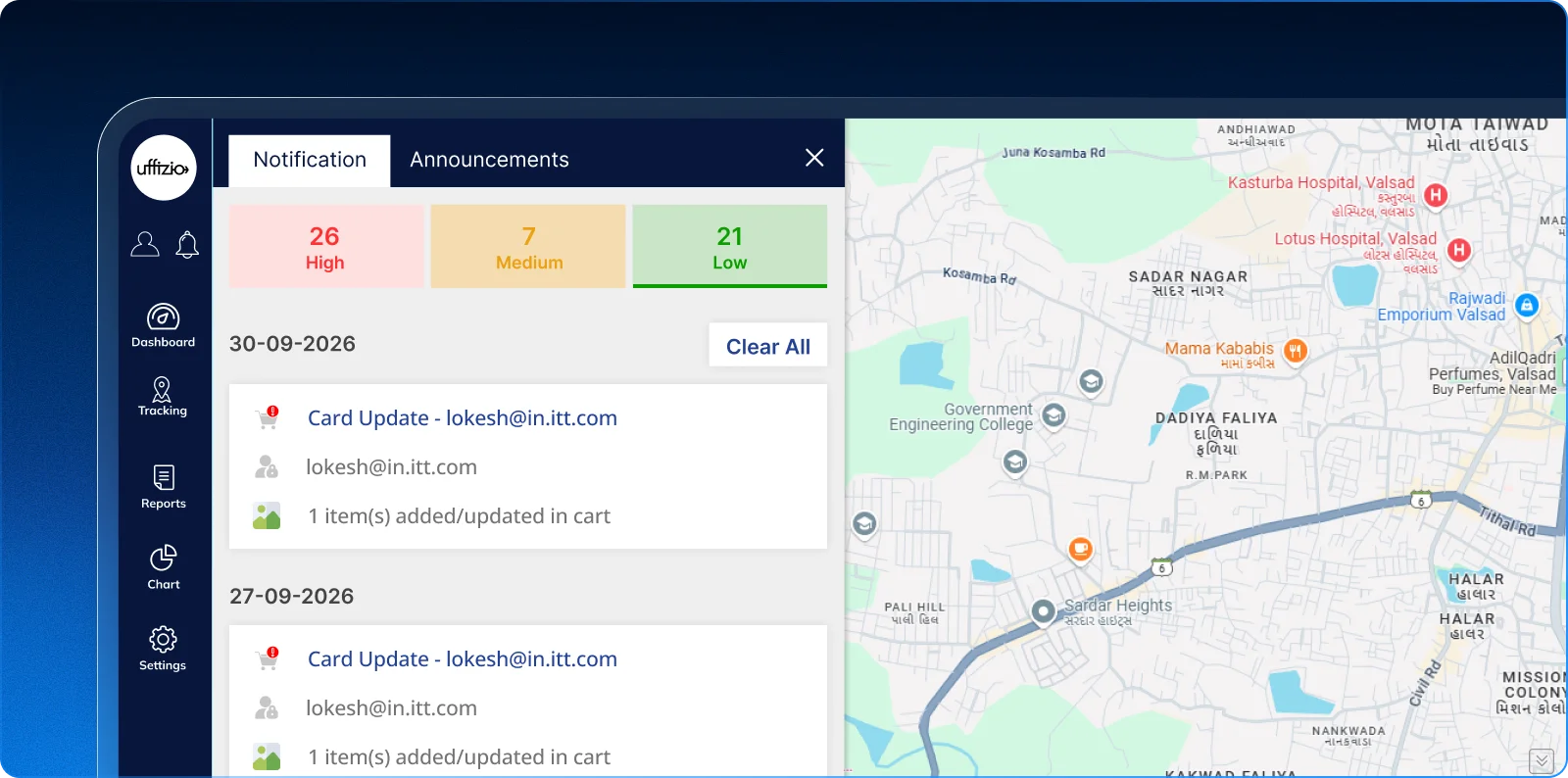
Missing a new order or a customer leaving items in their cart can delay follow-up and affect sales opportunities. SETU now brings these important events directly into the platform through timely notifications.
What’s new
- Get notified when a new order is received on SETU.
- View SETU order notifications directly in the platform Notification Panel.
- Get an alert when an item remains in a buyer’s cart for a set time.
- Give Admins and Resellers better visibility into important SETU activities.
How does this benefit you?
- Stay informed about new SETU orders without constantly checking the platform.
- Respond to new orders faster.
- Spot abandoned carts that may need follow-up.
- Keep important SETU activities visible in one place.
- Reduce the chance of missing potential sales opportunities.
 How does this help our partners?
For System Integrators and Resellers, these notifications make SETU easier to manage by bringing order activity and follow-up opportunities directly into the platform. This can help teams respond faster and stay closer to customer purchase activity.