
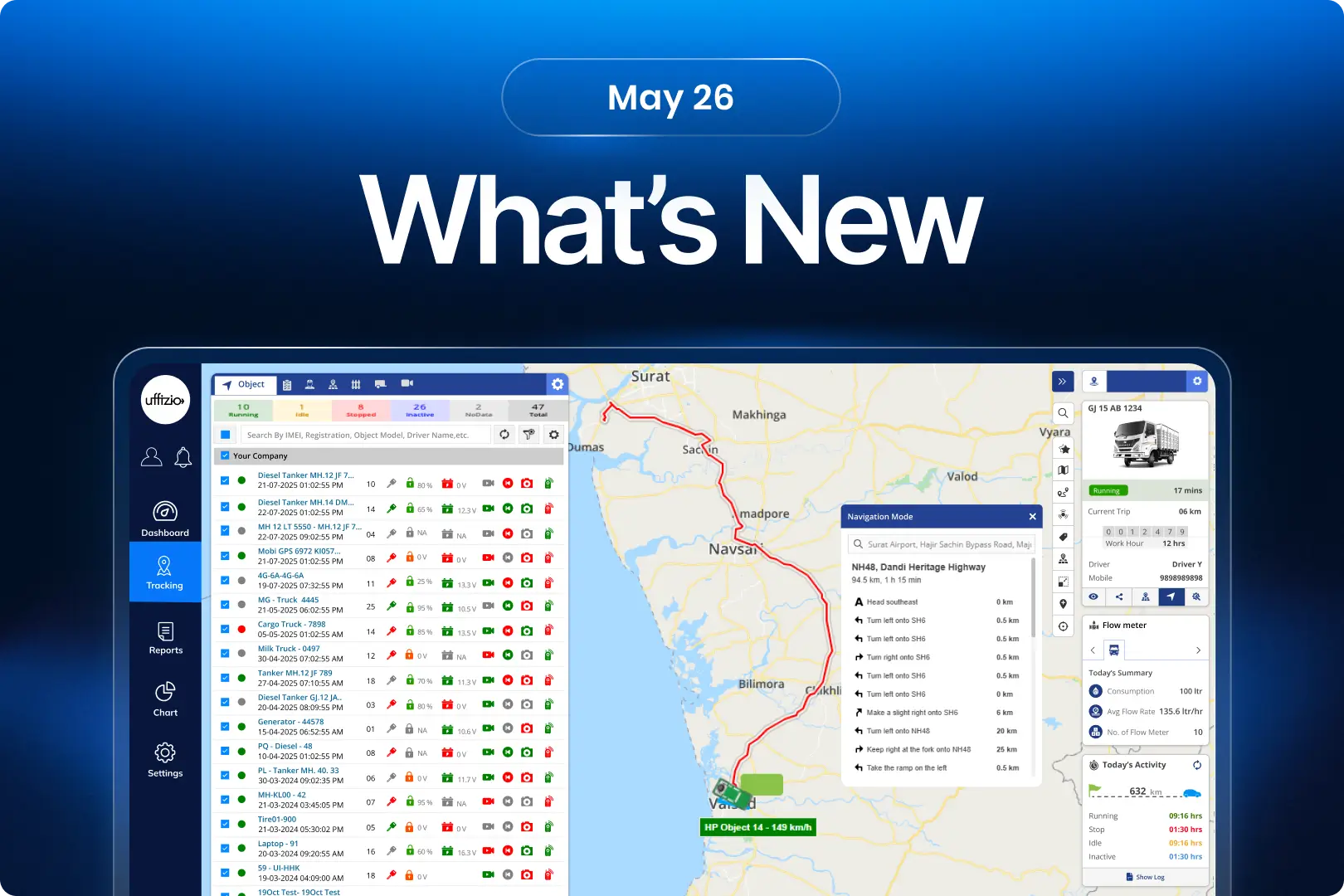
This month, we’ve introduced a range of enhancements across Trakzee, SmartWaste, and Gridzee, all designed to help organizations gain better visibility, improve operational efficiency, and simplify day-to-day management. From smarter fleet monitoring and advanced fuel intelligence to improved service verification, route optimization, and indoor navigation, these updates are focused on turning operational data into actionable insights. Each enhancement has been built to reduce manual effort, strengthen compliance, and help teams make faster, more informed decisions.
1.Trakzee updates
1.1 Ensure the right driver operates the right vehicle
Not every driver is licensed to operate every type of vehicle.
Earlier, there was no automated validation to ensure that the assigned driver’s license category matched the vehicle type being operated.
This created compliance and safety risks. Now, the system validates it automatically.
What’s new?
A new driver–vehicle type license mapping mechanism allows organizations to define which vehicle types a driver is authorized to operate based on their license category.
In addition, a driver–vehicle type mismatch alert automatically detects and notifies administrators whenever a driver starts a trip using a vehicle that does not match their permitted license category.
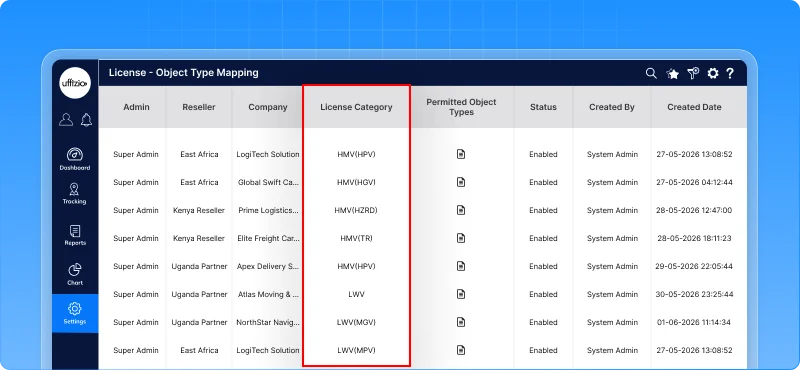
What this enables
- Map license categories to specific vehicle types
- Detect unauthorized vehicle usage automatically
- Receive instant email alerts when a mismatch occurs
- Enforce driver eligibility before operations begin
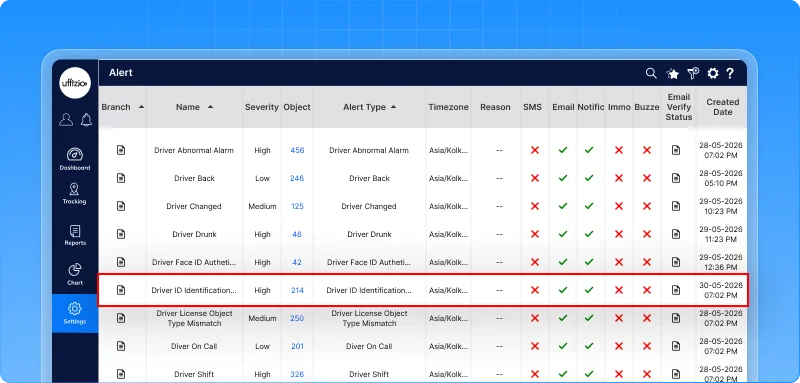
Why this matters
- Reduces compliance and regulatory risks
- Improves driver accountability
- Enhances fleet safety and governance
- Prevents incorrect vehicle assignments before they become operational issues
1.2 Smarter trailer mapping with BLE signal filtering
In busy yards, logistics hubs, and parking areas, multiple trailers can be located close to one another.
Earlier, every detected trailer could be considered for mapping, increasing the chances of a vehicle being linked to the wrong trailer. Now, trailer assignment is more precise.
What’s new?
The system now uses RSSI-based BLE signal filtering to identify and map the most relevant trailer to a vehicle. Using configurable signal thresholds, the platform:
- Filters out distant or irrelevant trailers
- Prioritizes the nearest trailer based on signal strength
- Supports both single trailer and multiple trailer mapping scenarios
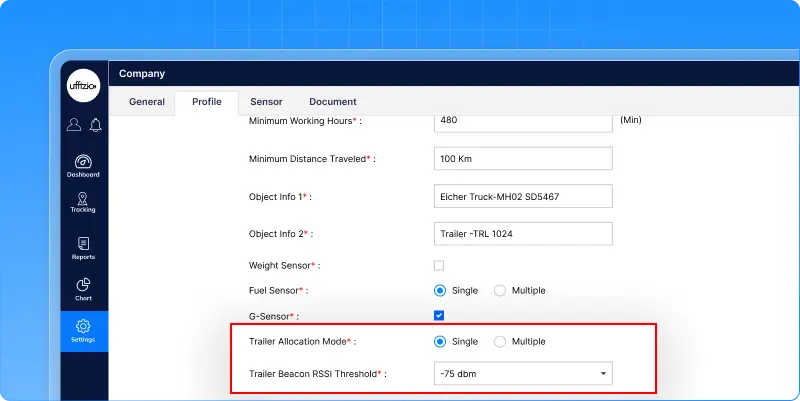
What this enables
- More accurate vehicle-to-trailer association
- Better visibility of connected assets
- Reduced chances of incorrect trailer assignments
- Flexible configuration based on operational requirements
Why this matters
- Improves tracking accuracy in dense parking and yard environments
- Reduces operational confusion caused by incorrect trailer mapping
- Provides more reliable data for fleet and logistics operations
- Enhances confidence in BLE-based trailer monitoring
1.3 Understand every event with duration insights in playback
When reviewing vehicle activity, knowing what happened is important. But knowing how long it lasted is what drives meaningful analysis.
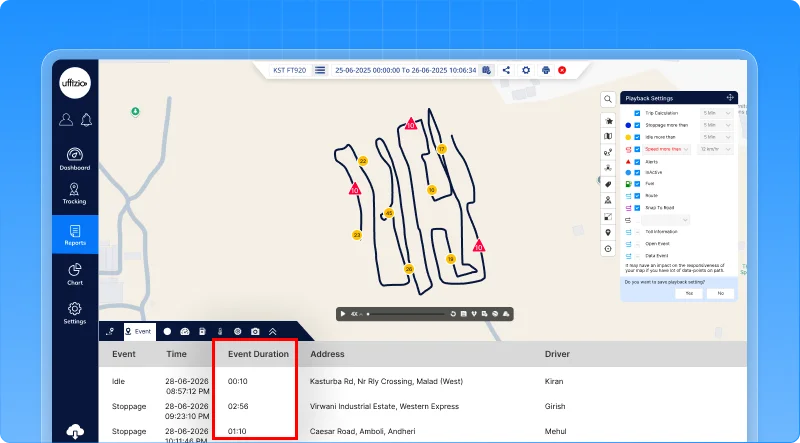
Earlier, users could see events like stoppages and idling in playback, but had to open separate reports to understand their duration. Now, everything is available in one place.
What’s new?
The playback events tab now displays the duration of each event directly within the event timeline.
In addition, users can export the complete event list, including duration details, into Excel for further analysis and reporting.
What this enables
- View event duration without leaving playback
- Analyze stoppages, idling, and other events in a single screen
- Export event timelines with duration information
- Reduce dependency on multiple reports
Why this matters
- Speeds up event analysis and investigation
- Provides better context for operational decisions
- Improves reporting efficiency
- Makes Playback a more complete analysis tool
1.4 Choose your preferred navigation experience
When a vehicle needs to be located quickly, users often prefer the navigation tool they already use every day.
Earlier, navigation was limited to the platform’s built-in map experience. Now, users have a choice.
What’s added
A new navigation mode selection is introduced in live tracking.
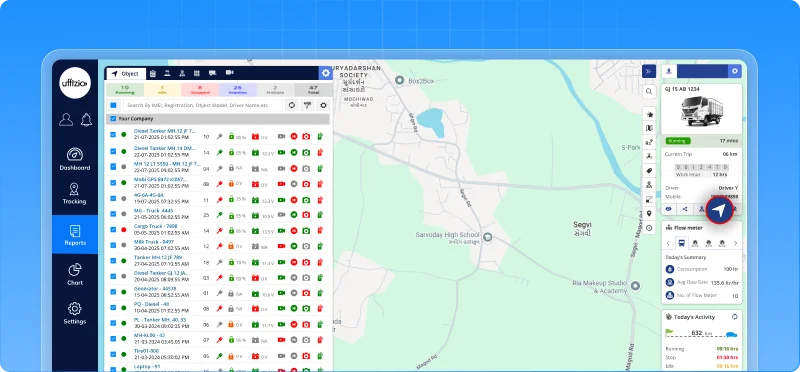
When users click the navigation button, they can choose between:
- In-App navigation for the existing platform experience
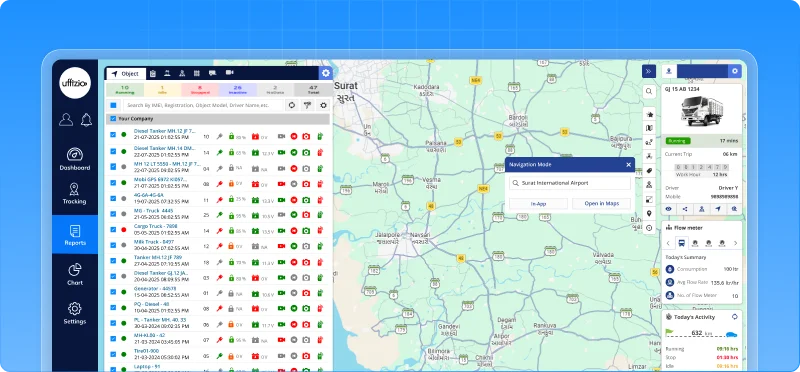
- External navigation to open the vehicle location directly in Google Maps
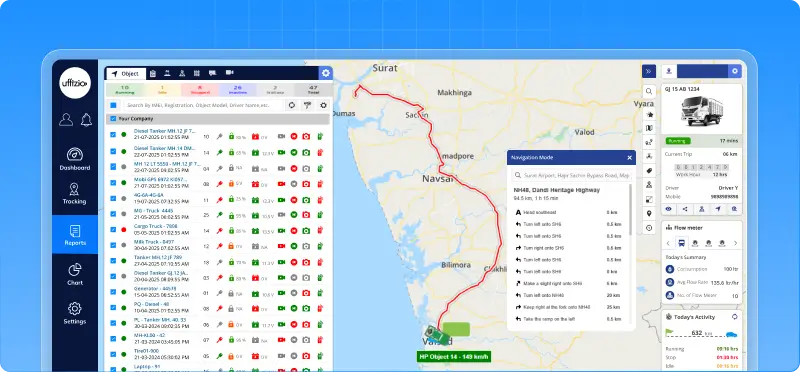
The selected location opens in a new browser tab, allowing users to navigate without leaving the platform.
What this enables
- Navigate using familiar tools like Google Maps
- Switch between in-app and external navigation as needed
- Access real-time vehicle locations more conveniently
- Continue monitoring operations while navigation runs separately
Why this matters
- Improves user flexibility and convenience
- Creates a consistent experience across web and mobile platforms
- Reduces dependency on a single navigation method
- Helps field teams reach vehicles faster using their preferred navigation tool
1.5 Fleet status at a glance with home screen widgets
Fleet managers don’t always have time to open the app, navigate through menus, and check vehicle status. Sometimes, they just need a quick answer. How many vehicles are running? How many are idle? Is anything inactive?
Now, that information is available right on the home screen.
What’s added
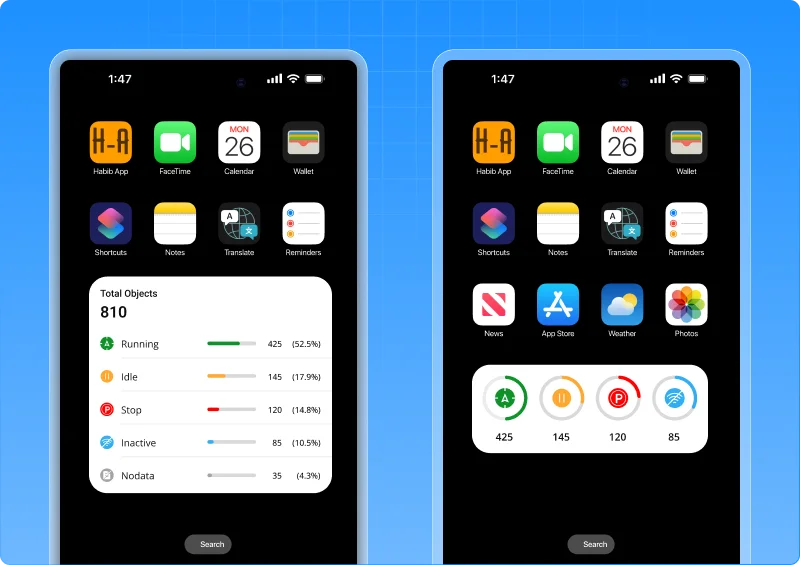
Trakzee now offers native home screen widgets for both Android and iOS, allowing users to view key fleet information without opening the application.
The widgets display:
- Running vehicles
- Idle vehicles
- Stopped vehicles
- Inactive vehicles
- Total fleet status overview
Multiple widget sizes are available to suit different user preferences and screen layouts.
What this enables
- Monitor fleet status instantly from the home screen
- Reduce dependency on opening the application for routine checks
- Access critical fleet information in real time
- Choose widget layouts based on operational needs
Why this matters
- Faster visibility into fleet operations
- Improved responsiveness for dispatchers and managers
- Better user experience with fewer clicks
- Makes Trakzee a part of the daily mobile workflow
Now, fleet monitoring doesn’t start when the app opens it starts the moment the phone screen lights up.
1.6 Reach any screen in seconds with IOS spotlight search
As fleet operations grow, so does the number of reports, dashboards, and management screens.
Finding the right screen often means navigating through multiple menus, which takes time when quick decisions are needed. Now, there’s a faster way.
What’s added
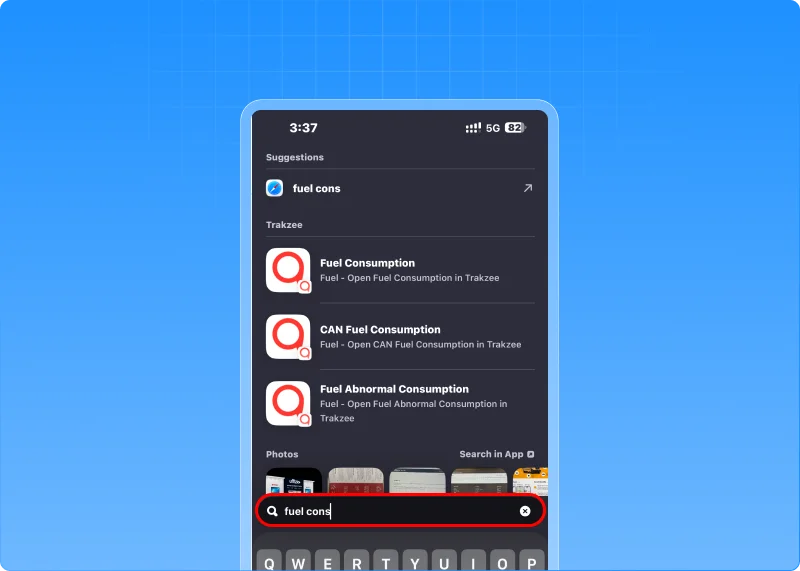
Trakzee now integrates with iOS Spotlight Search, allowing users to search and open app screens directly from the iPhone home screen.
Simply type the name of a report, dashboard, or module, and Spotlight instantly displays matching Trakzee screens.
With a single tap, users are taken directly to the required screen without navigating through menus. More than 100 screens across tracking, reports, alerts, fuel, EV monitoring, drivers, geofences, and settings are searchable.
What this enables
- Find any report or module in seconds
- Access screens directly from the iPhone home screen
- Reduce dependency on menu navigation
- Improve productivity for fleet managers and dispatch teams
Why this matters
- Faster access to critical information during operations
- Shorter learning curve for new users
- Reduced time spent searching for reports and settings
- Creates a modern, mobile-first user experience
1.7 Share location with real-time ETA & flexible link validity
Sharing a vehicle’s location is useful but often, users need more control and context. Earlier, shared tracking links could only be configured in hours and provided no visibility into the vehicle’s expected arrival time.
This limited their usefulness for deliveries, service visits, and time-sensitive operations. Now, that’s changed.
What’s updated
The share location API now supports:
- Minute-level validity for more precise link sharing
- Real-time ETA visibility in shared tracking links
- Route information for better journey tracking
All enhancements are fully backward compatible, ensuring existing integrations continue to work without modification.
What this enables
- Create tracking links for short-duration use cases
- Share expected arrival times with customers and stakeholders
- Improve visibility into vehicle progress and route status
- Deliver a more informative tracking experience
Why this matters
- Reduces uncertainty around vehicle arrival times
- Improves customer communication and service experience
- Supports delivery, logistics, and field-service operations
- Makes shared tracking links more useful and actionable
Now, users don’t just know where a vehicle is they know when it’s expected to arrive.
1.8 Unlock deeper trip insights through APIs
Every fleet operates differently. Some organizations need more than standard trip data—they need deeper visibility into how trips are classified, analyzed, and reported within their own systems.
Now, that data is easier to access.
What’s changed
The user customize API has been expanded with new trip classification reports, allowing integrators to retrieve detailed trip categorization data directly through APIs. Newly available reports include:
- Trip Classification Summary
- Trip Classification Detail
- Object Trip Classification Summary
- Object Trip Classification Detail
What this enables
- Access trip classification data through APIs
- Build custom dashboards and analytics workflows
- Integrate trip insights into third-party platforms
- Create object-wise operational and performance reports
Why this matters
- Provides greater flexibility for enterprise integrations
- Reduces dependency on manual report extraction
- Enables advanced analytics and business intelligence initiatives
- Helps organizations derive more value from operational trip data
Now, trip classification insights are not limited to reports—they’re available wherever your business needs them.
1.9 Connect every expense to the right vendor
Managing expenses is important. Understanding who those expenses were paid to is even more valuable. Earlier, expenses could be recorded and reported, but there was no direct connection between an expense and the vendor behind it.
This made vendor-wise analysis, auditing, and cost tracking difficult. Now, every expense can tell a more complete story.
What’s added
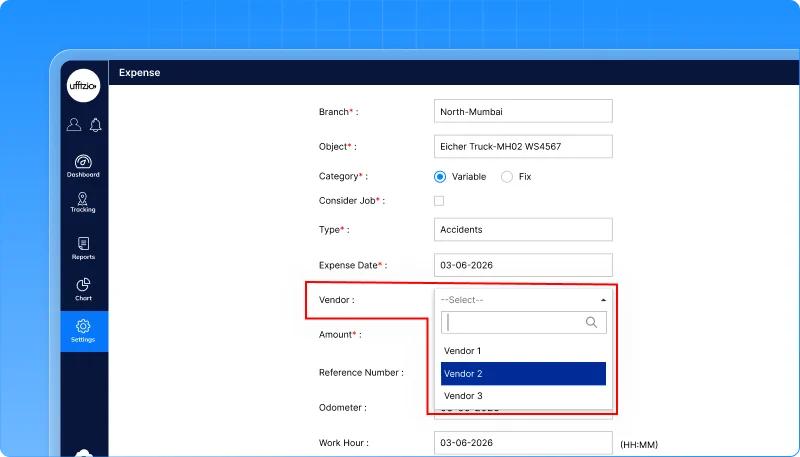
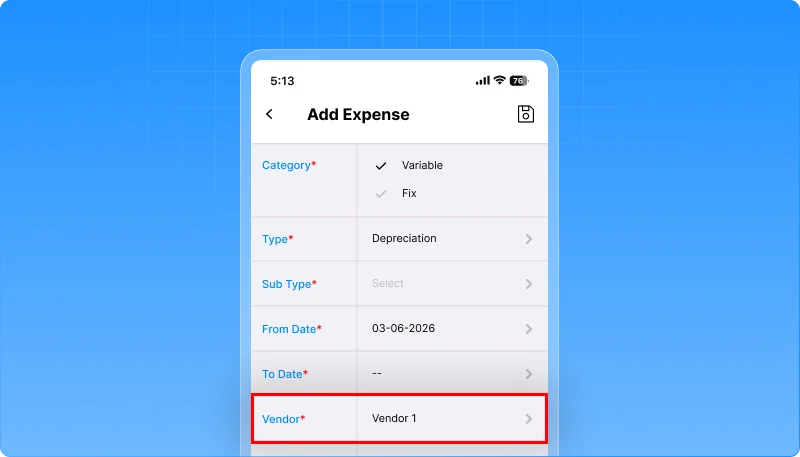
The Expense Management module now supports vendor association across the platform. Users can optionally select a vendor while recording expenses, and that information is automatically reflected across:
- Expense entries
- Bulk uploads
- Live Tracking expense logging
- Expense history
- Expense reports and exports
The feature integrates directly with the existing Vendor Master, ensuring consistent and validated vendor information.
What this enables
- Track expenses against specific vendors
- Simplify vendor-wise cost analysis
- Improve financial visibility across operations
- Maintain consistent vendor information across reports and records
Why this matters
- Makes expense auditing faster and more accurate
- Reduces manual effort in identifying vendor-related costs
- Improves cost control and spending transparency
- Helps organizations make better vendor and procurement decisions
Now, expenses are no longer isolated records they’re connected to the vendors behind them, unlocking complete vendor-level expense visibility.
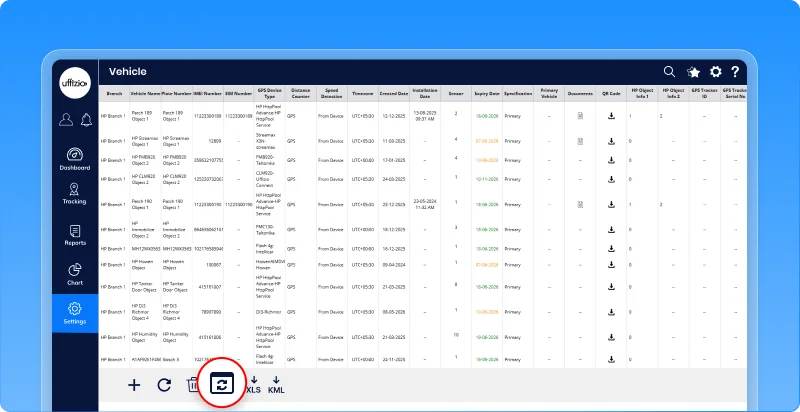
1.10 Update multiple vehicles in one go
Managing fleet data is essential, but updating vehicle information one record at a time can quickly become a tedious task.
For large fleets, even small changes across multiple vehicles can consume valuable time and increase the risk of manual errors. Now, bulk updates make the process much simpler.
What’s updated
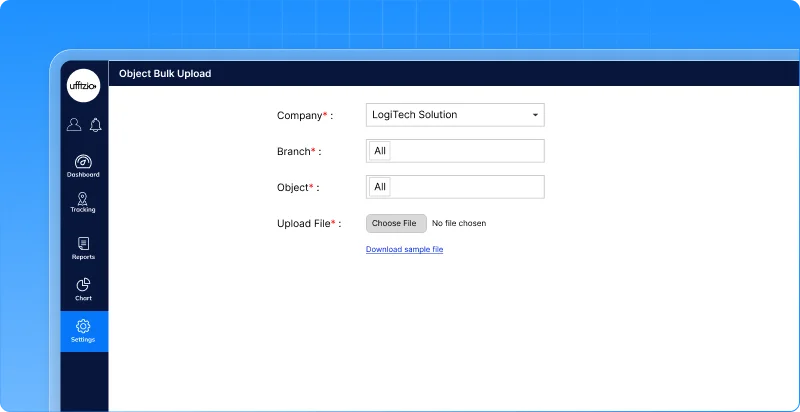
A new bulk update option is introduced in the object overview screen. Users can now:
- Download a sample file containing existing vehicle information
- Update multiple vehicle records offline
- Upload the file back into the system
- Apply changes to multiple vehicles in a single operation
The system validates uploaded data before processing, ensuring accuracy and consistency across records.
What this enables
- Update hundreds of vehicle records simultaneously
- Reduce manual data entry efforts
- Maintain consistent object information across the fleet
- Simplify large-scale fleet administration
Why this matters
- Saves significant administrative time
- Reduces human errors during data updates
- Improves data accuracy across vehicle records
- Makes fleet management more scalable as operations grow
Now, vehicle updates don’t have to happen one record at a time they can be managed in bulk, with speed and confidence.
1.11 Customize RAG scoring to match your operations
Not all fleets operate the same way. For some businesses, a few minutes of idling may be acceptable. For others, it directly impacts fuel costs, productivity, and sustainability goals.
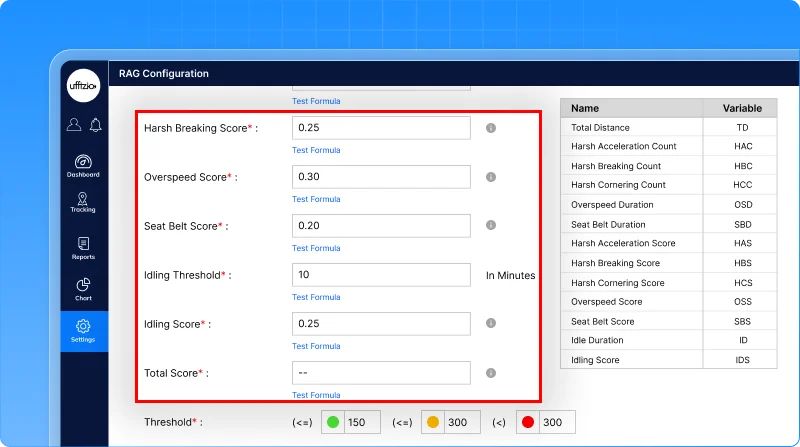
Earlier, idling behavior could not be configured as part of the RAG scoring model, limiting the accuracy of performance evaluation. Now, fleets can define what matters most to them.
What’s updated
The RAG Configuration module now includes idle threshold and idling score settings. Users can:
- Define the minimum idle duration that should be considered an idling event
- Assign a score impact to idling behavior
- Include idling performance as part of overall RAG evaluation
The RAG report has also been enhanced to display additional idling and seatbelt metrics, providing a more complete view of driver and vehicle performance
What this enables
- Configure idling rules based on operational requirements
- Measure idling performance more accurately
- Incorporate fuel-wasting behavior into driver scoring
- Gain deeper visibility into operational efficiency
Why this matters
- Helps reduce unnecessary fuel consumption
- Encourages better driving behavior
- Makes RAG scoring more relevant to different fleet types
- Provides a more comprehensive performance assessment
Now, RAG scores don’t just reflect movement and safety they also account for how efficiently vehicles are being operated.
1.12 Customize idle detection as per needs
Not every fleet defines idling the same way. For some operations, a stationary vehicle means fuel wastage. For others, the vehicle may be actively working while remaining in one place.
Using a single idle rule for every fleet can lead to inaccurate reporting and misleading performance analysis.
Now, users can define idle conditions their way.
What’s changed
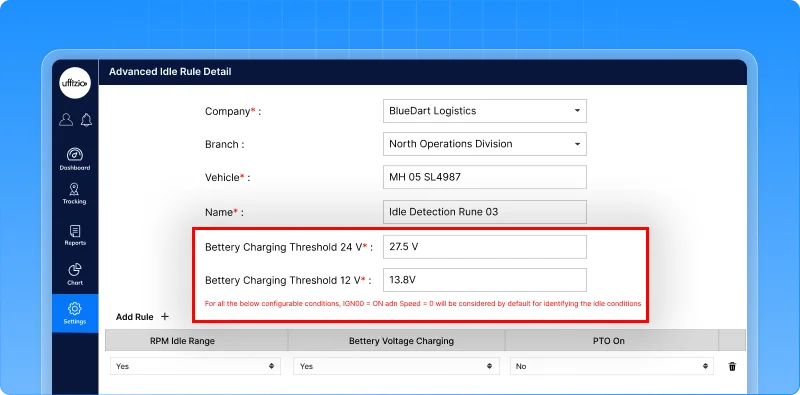
A new dynamic idle condition configuration allows users to customize how idle status is determined within the platform.
Instead of relying on a fixed system-defined rule, organizations can configure idle conditions based on their operational requirements, ensuring that vehicle status reflects real-world activity more accurately.
What this enables
- Configure idle logic to match specific fleet operations
- Improve accuracy of idle status calculations
- Reduce false idle detections
- Apply customized idle rules across selected vehicles
Why this matters
- Makes idle reporting more relevant and actionable
- Improves fuel-efficiency and utilization analysis
- Helps distinguish operational activity from genuine idle time
- Delivers fleet insights that align with actual business processes
Now, idle status isn’t defined by a one-size-fits-all rule it’s defined by how your fleet actually works.
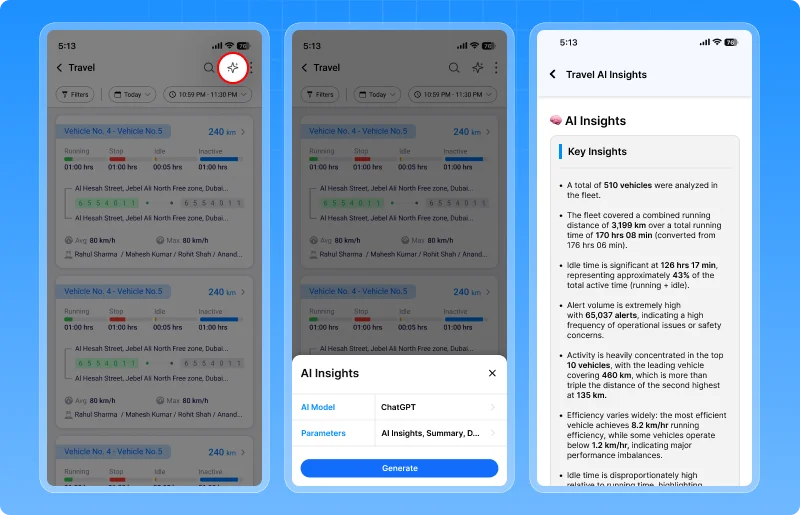
1.13 AI insights, now available on mobile
Making informed decisions often requires access to reports and analytics. Earlier, users had to rely on the web platform to generate AI-powered insights, making it difficult to access critical intelligence while on the move.
Now, powerful insights are available wherever you are.
What’s updated
AI-powered Insights Reports can now be generated directly from the mobile application.
Users can instantly access intelligent summaries, analytics, and operational insights without switching to the web platform.
What this enables
- Generate AI-powered insights from mobile devices
- Access operational intelligence on the go
- Monitor fleet performance without relying on a desktop
- Make faster, data-driven decisions from anywhere
Why this matters
- Improves operational visibility
- Speeds up decision-making
- Enhances productivity for field and operations teams
- Brings AI-powered intelligence closer to day-to-day operations
Now, actionable insights are available not just in the office but wherever business happens.
1.14 Zoom into every detail during live streaming
When monitoring live video feeds, the smallest detail can make the biggest difference. Earlier, users could view live streams but had limited ability to inspect specific areas of footage during monitoring or investigations. Now, critical details are easier to see.
What’s added
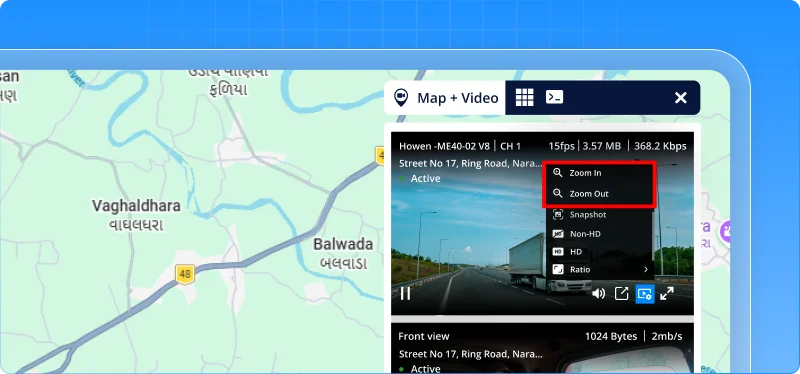
A new zoom in / zoom out feature has been added to the live streaming player.
Users can magnify video footage in real time, making it easier to inspect incidents, verify events, and monitor activities with greater clarity.
What this enables
- Zoom into live video feeds instantly
- Examine critical events more closely
- Improve evidence verification
- Enhance monitoring and surveillance accuracy
Why this matters
- Supports faster incident investigation
- Improves visibility of important details
- Strengthens evidence collection and validation
- Delivers a better video monitoring experience
Now, live streaming doesn’t just show what’s happening—it helps you see the details that matter most.
1.15 Turn critical alerts into immediate action
Fleet operators often define rules to protect their vehicles and enforce operational policies. For example, a delivery vehicle may be authorized to operate only until 6 PM, or a vehicle may be assigned to a specific driver carrying an approved beacon.
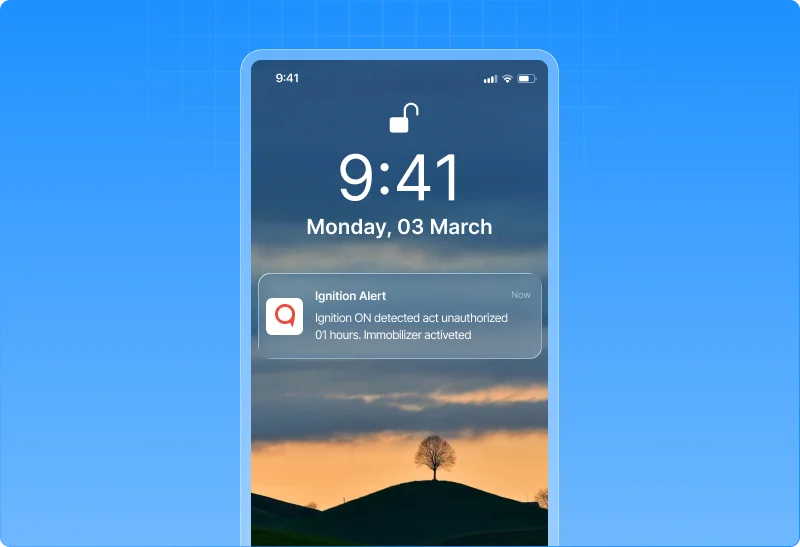
Earlier, if a vehicle ignition was turned on after authorized hours or a Beacon Alert indicated an unauthorized driver presence, the platform would simply generate an alert and wait for an operator to take action. By the time the alert was reviewed, the vehicle could already be on the move.
Now, that response can be automated.
What’s changed
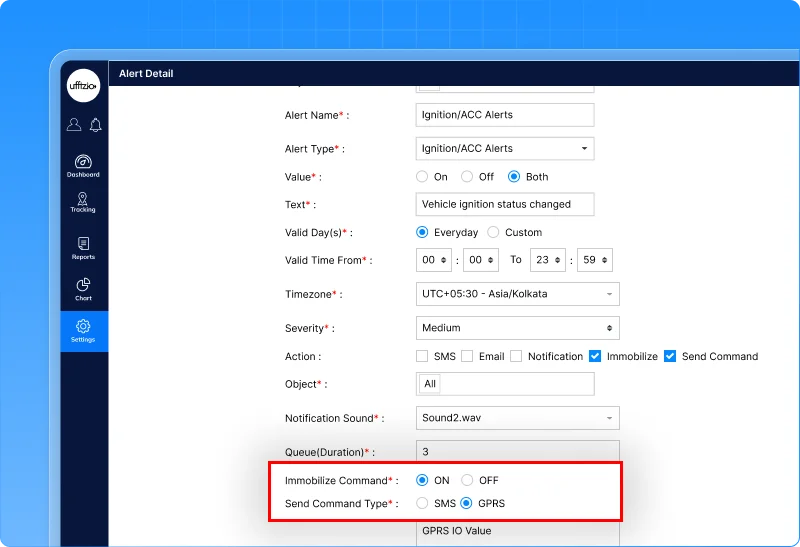
The platform can now automatically execute predefined actions when critical alerts are triggered.
For supported alerts such as:
- Ignition alerts
- Beacon alerts
the system can:
- Automatically immobilize the vehicle
- Send commands directly to the device
- Trigger immediate action without waiting for operator intervention
What this enables
- Automated response to critical fleet events
- Faster enforcement of operating policies
- Reduced dependency on manual monitoring
- Greater control over vehicle usage and driver compliance
Why this matters
- Helps prevent unauthorized vehicle operations
- Reduces response time during policy violations
- Strengthens fleet security and operational control
- Supports proactive fleet management rather than reactive monitoring
1.16 Handbrake safety monitoring for every stop
Parking a vehicle may seem routine, but a simple oversight can lead to serious consequences.
If a driver switches off the ignition without applying the handbrake, the vehicle may unintentionally move, especially on slopes, loading areas, construction sites, or uneven terrain. Such incidents can result in vehicle damage, operational disruptions, or even safety risks for people nearby.
Now, fleets can be alerted before a small mistake becomes a costly incident.
What’s added
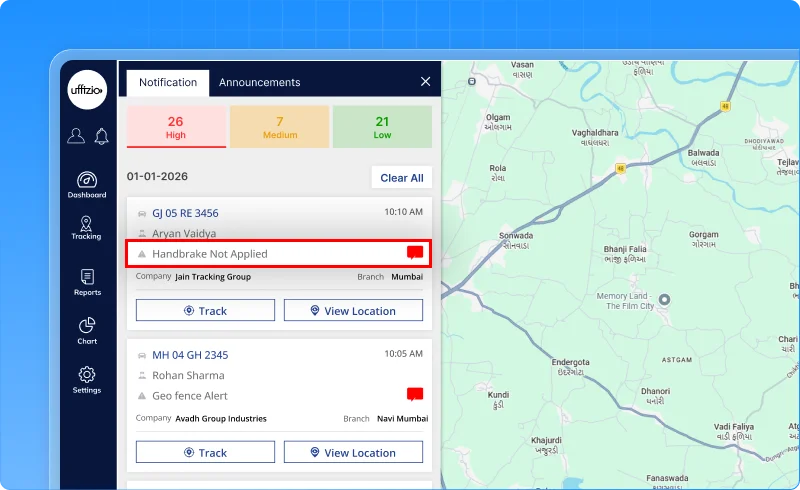
A new handbrake safety alert has been introduced in Trakzee. The alert automatically detects situations where the ignition is switched off but the handbrake has not been engaged within a configurable time period.
Users can configure the alert duration between 10 and 120 seconds, allowing organizations to align notifications with their operational requirements.
The feature is available across both web and mobile platforms.
What this enables
- Detect vehicles left without the handbrake applied
- Receive timely alerts before a potential roll-away incident occurs
- Configure alert timing based on operational needs
- Improve driver adherence to safety procedures
Why this matters
- Reduces the risk of vehicle roll-away incidents
- Promotes safer parking practices
- Protects vehicles, assets, and personnel
- Strengthens fleet-wide safety compliance
Now, safety doesn’t stop when the engine turns off it continues until the vehicle is secured.
1.17 Ensure driver presence while the vehicle is running
A vehicle may be started by an authorized driver, but that doesn’t always mean the driver stays with the vehicle.
In operations such as deliveries, construction sites, warehouses, and field services, drivers sometimes step away while leaving the engine running. This can create safety risks, increase fuel wastage, and leave vehicles vulnerable to unauthorized use.
Now, fleets can automatically detect when a running vehicle is left behind without its assigned driver.
What’s updated
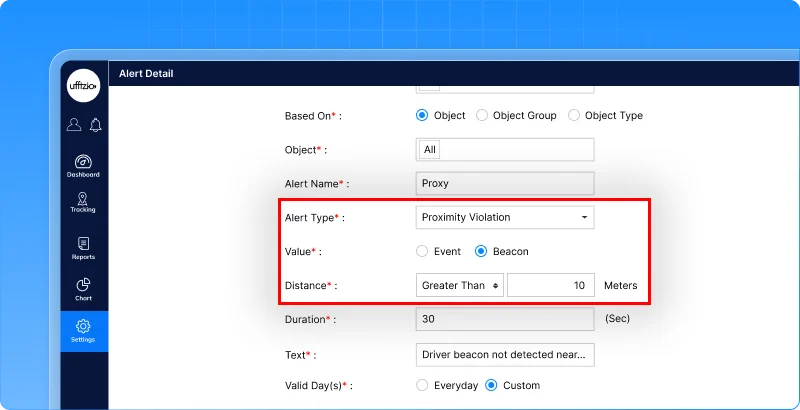
The proximity violation alert now supports configurable distance-based triggering in beacon mode.
Using a new “Greater Than” distance parameter, organizations can define how far an authorized driver’s beacon can move away from a vehicle before an alert is generated.
For example, if a driver starts the vehicle and walks away carrying their beacon, the system can trigger an alert when the distance between the vehicle and beacon exceeds a predefined threshold such as 100 or 200 meters.
What this enables
- Detect running vehicles without an authorized driver nearby
- Configure acceptable driver-to-vehicle distance limits
- Enforce driver presence policies automatically
- Improve monitoring of beacon-based driver identification
Why this matters
- Reduces unattended vehicle risks
- Helps prevent unauthorized vehicle usage
- Improves compliance with driver accountability policies
- Strengthens operational safety and security
Now, it’s not enough for the right driver to start the vehicle—the system can help ensure they’re still with it.
1.18 Ensure 4WD compliance in critical operating zones
In many industries, simply entering a vehicle into a mining site, construction zone, plantation, quarry, or off-road area isn’t enough. Drivers are often required to engage 4WD mode before operating in these environments to ensure proper traction, vehicle control, and safe operation.
However, manually verifying whether drivers have switched to 4WD can be difficult, especially across large fleets. Now, Trakzee helps enforce these operational requirements automatically.
What’s updated
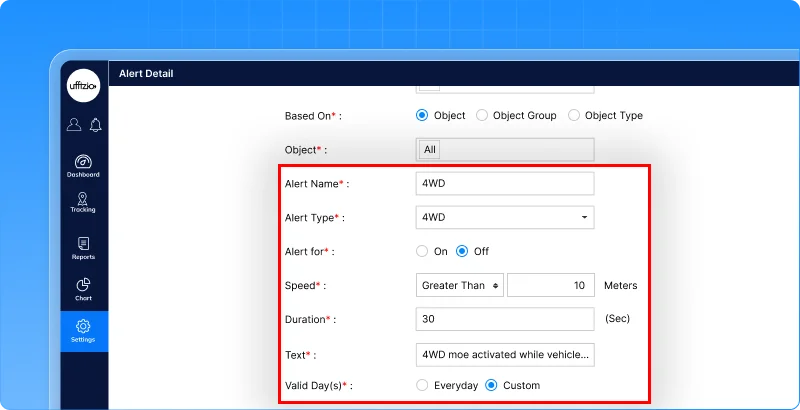
A new 4WD compliance alert monitors whether vehicles are operating in the required drive mode within designated areas.
The alert can be configured to:
- Monitor 4WD engagement status
- Trigger alerts after a configurable duration (10–120 seconds)
- Apply only within specific geofenced areas
- Notify users through both web and mobile platforms
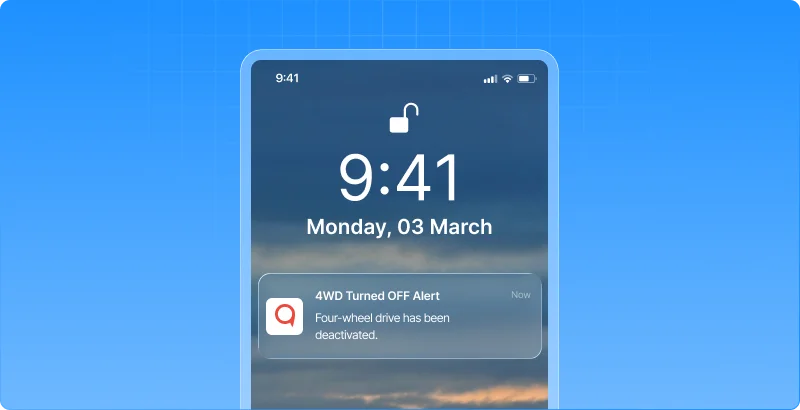
If a vehicle enters a designated zone and the required 4WD mode is not engaged within the configured time, the system can trigger an alert for corrective action.
1.19 Critical fuel & temperature insights, now on mobile
Fleet operations don’t always happen from a control room. Supervisors, managers, and field teams often rely on mobile devices to monitor vehicles while on the move.
However, until now, critical telemetry data such as fuel and temperature was only available through the web application, limiting visibility for mobile users. Now, key vehicle health and fuel metrics travel with you.
What’s updated
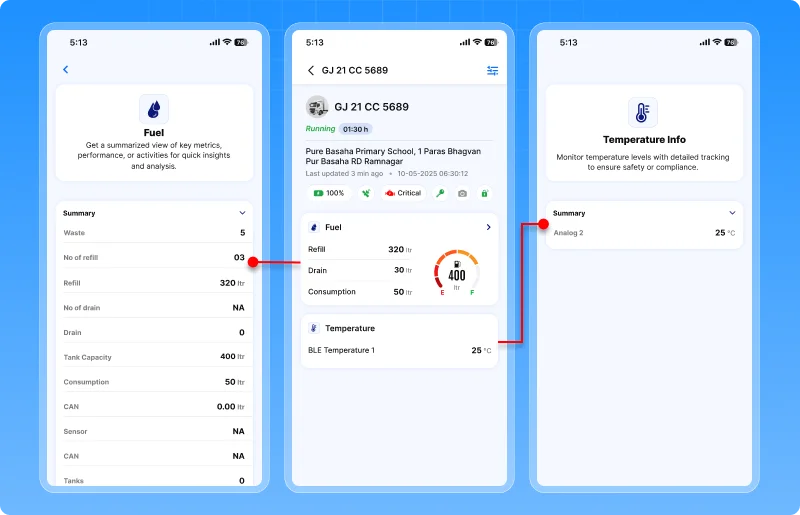
The driver mobile application now includes dedicated fuel and temperature widgets within live tracking.
Users can instantly view:
Fuel information
- Fuel level
- Fuel refill events
- Fuel drain events
- Fuel consumption
- Tank consumption
Temperature information
- Current temperature
In addition, users can manage widget visibility through a show/hide option, allowing them to personalize their live tracking experience based on operational needs.
What this enables
- Monitor fuel status directly from mobile devices
- Track temperature-sensitive assets while on the move
- Access critical vehicle telemetry without switching platforms
- Customize Live Tracking screens based on user preferences
Why this matters
- Improves real-time operational visibility
- Helps users respond faster to fuel and temperature-related issues
- Brings mobile and web monitoring experiences closer together
- Enables field teams to make informed decisions from anywhere
Now, critical fleet information isn’t limited to the control room it stays in the hands of the people managing operations every day.
1.20 See the Complete Fuel Story in One Report
Understanding fuel performance often requires looking at multiple pieces of information together. Fuel fills, fuel drains, trip activity, mileage, consumption, and vehicle performance all contribute to the bigger picture.
Until now, these details were spread across different reports, forcing fleet managers to switch between screens and manually correlate data. Now, all critical fuel insights come together in a single report.
What’s updated
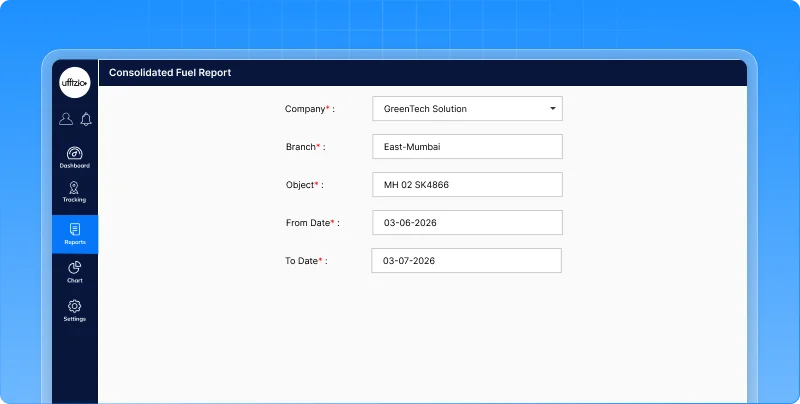
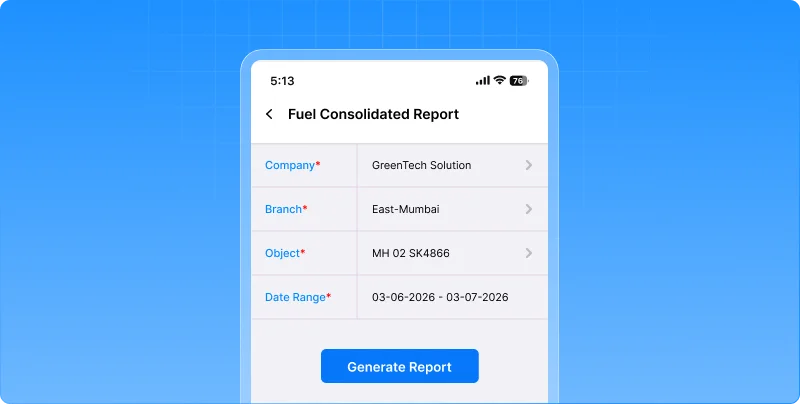
A new consolidated fuel report brings fuel activity, trip information, and consumption data into one downloadable PDF.
Using simple filters such as company, branch, vehicle, and date range, users can generate a comprehensive report that includes:
- fuel fill events
- fuel drain events
- trip details
- mileage
- fuel consumption
- speed metrics
- driver information
- fuel charts
- summary statistics
The report is available across both web and mobile platforms, making fuel analysis easier and more accessible.
What this enables
- Review all fuel-related activity in a single report
- Analyze fills, drains, trips, and consumption together
- Reduce time spent switching between multiple reports
- Share fuel performance data through downloadable PDFs
Why this matters
- Simplifies fuel monitoring and investigation
- Improves visibility into fuel consumption patterns
- Helps identify unusual fuel activity more quickly
- Supports operational reviews with consolidated fuel intelligence
- Makes decision-making faster with all relevant data in one place
Now, instead of piecing together information from multiple reports, fleet managers can view the complete fuel story from a single source.
2. Smartwaste updates
2.1 Flexible weight capture for real-world waste operations
Not every waste collection operation records weight in the same way. While some organizations capture waste weight at every collection point, others measure the total collected waste only after the vehicle reaches a transfer station, landfill, or weighing facility.
Using a single weight-entry approach for all operations can create unnecessary complexity, increase data-entry effort, and lead to inaccurate records. Now, SmartWaste adapts to the way your operations actually work.
What’s changed
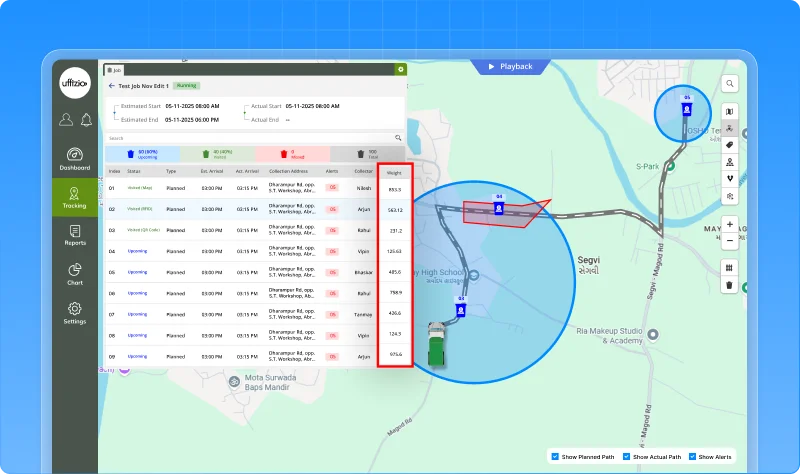
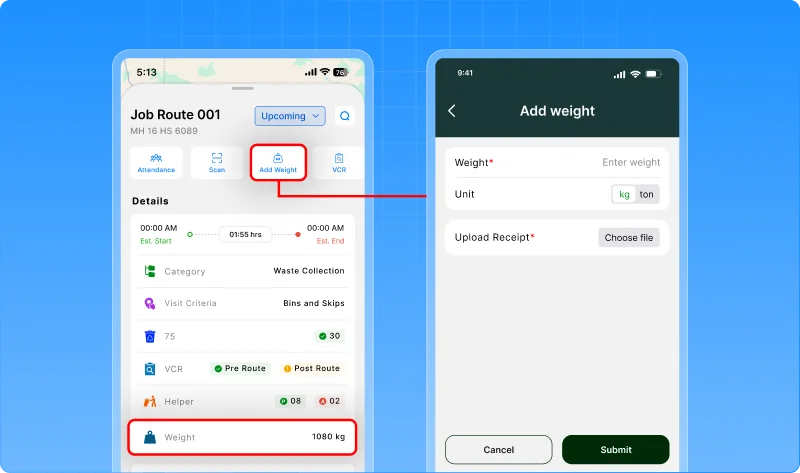
A new job-level weight capture option allows organizations to choose how waste weight is recorded during collection operations.
During job planning, users can configure whether weight should be captured:
- At the job level (single total weight entry)
- At the checkpoint level (existing workflow)
The selected method is automatically reflected across the collector app, weight module, live tracking, and reports.
What this enables
- Capture a single total weight for an entire collection job
- Continue using checkpoint-level weight collection where required
- Simplify weight entry for collection teams
- Upload and manage weight slips against completed jobs
- Maintain centralized visibility across operational modules
Why this matters
- Supports regional and operational collection practices
- Reduces manual effort for drivers and collectors
- Improves weight data accuracy and consistency
- Simplifies reporting and waste audit processes
- Provides greater flexibility without changing existing workflows
Now, weight collection isn’t limited to a single process it’s aligned with the way your waste operations actually measure and manage collected material.
2.2 Measure complaint resolution performance at a glance
Receiving citizen complaints is only part of the process. What truly matters is how quickly those complaints are addressed and resolved.
Earlier, the Complaint Summary Report showed whether a complaint was open or closed, but it did not provide visibility into when the complaint was resolved or how long resolution took.
Managers often had to manually compare timestamps or rely on separate analyses to assess service performance. Now, that information is available instantly.
What’s updated
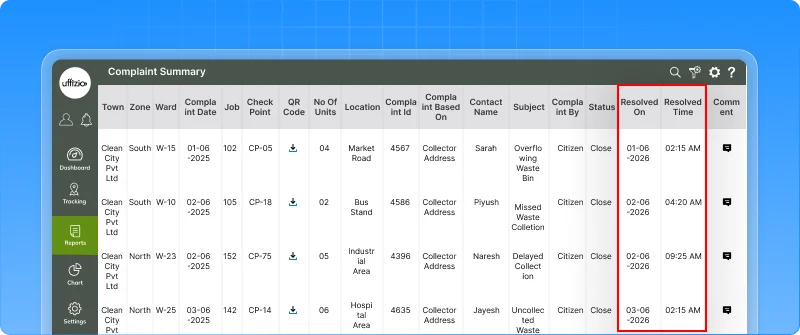
The complaint summary report now includes two new performance-focused metrics:
- Resolved on – Displays the exact date and time when a complaint was closed.
- Resolution time – Shows the total time taken to resolve the complaint, calculated from the moment it was reported until closure.
These details are also available in exported reports, ensuring performance data remains accessible for reviews, audits, and stakeholder reporting.
What this enables
- Track complaint resolution timelines directly from the report
- Measure responsiveness without manual calculations
- Review service performance across teams and zones
- Include resolution metrics in exported reports and presentations
Why this matters
- Improves accountability across complaint-handling operations
- Helps managers identify delays in service resolution
- Supports performance reviews and operational planning
- Provides greater transparency for municipalities and service providers
Now, the report doesn’t just show whether a complaint was resolved it shows how efficiently it was resolved.
2.3 Create roadfences directly from vehicle playback
Operations teams often discover the best collection routes only after reviewing actual vehicle movements in Playback.
Earlier, if a supervisor wanted to convert a successful route into a Roadfence, they had to leave the Playback screen, navigate to configuration modules, and recreate the route manually. This added unnecessary effort and slowed down route optimization activities.
Now, route creation happens where the analysis happens.
What’s updated
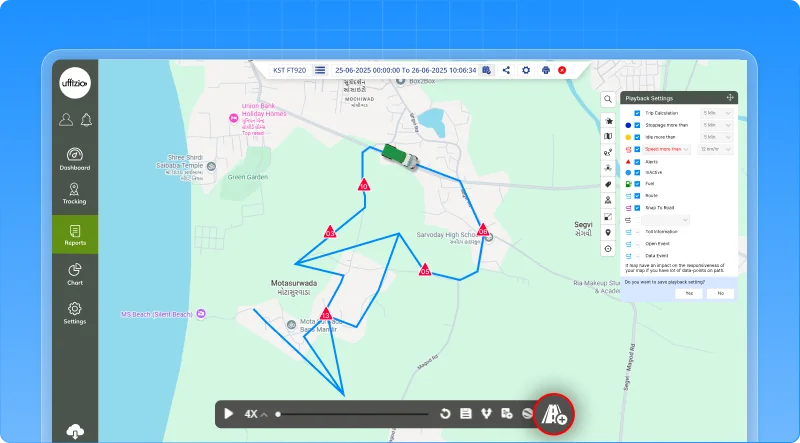
A new roadfence creation option is now available directly within the playback screen.
While reviewing historical vehicle movement, users can instantly create a Roadfence using the route already displayed in playback.
The system automatically uses the playback route as the Roadfence path, allowing users to review, save, and use it for future monitoring and compliance activities.
What this enables
- Create Roadfences directly from vehicle playback data
- Eliminate manual route recreation
- Build route-based geofences using actual collection patterns
- Improve route planning and operational standardization
Why this matters
- Reduces time spent switching between operational and configuration screens
- Makes route setup faster and more intuitive
- Helps teams create geofences based on real-world collection behavior
- Strengthens route compliance and deviation monitoring for municipal contracts
Now, the routes you analyze can become the routes you monitor without leaving Playback.
2.4 Turn vehicle idle time into service proof
In waste collection operations, proving that a vehicle truly serviced a location can sometimes be challenging.
A vehicle may remain stationary while waste is being collected, bins are being emptied, or collection activities are being completed. However, relying only on geofence crossings or GPS positions may not always provide a complete picture of what happened on-site.
Now, SmartWaste can use vehicle idle behavior as an additional indicator of service activity.
What’s updated
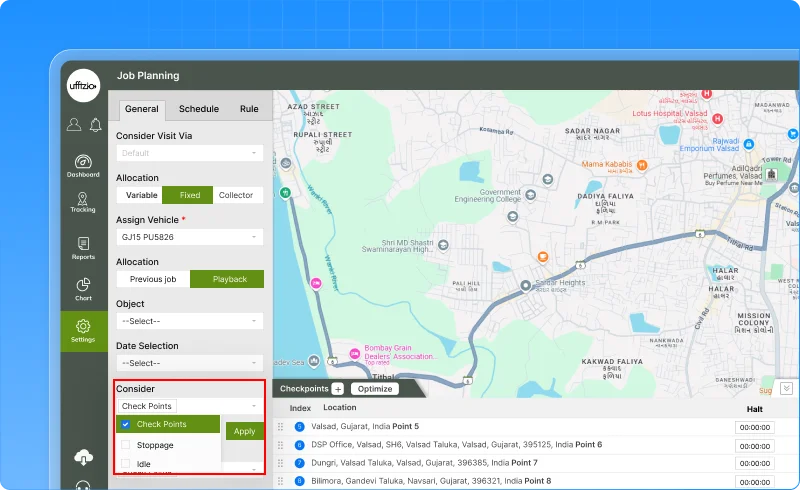
Playback-based job creation now supports idle point-based collection address mapping.
When reviewing playback data, the system can identify locations where vehicles remained idle and use those points to generate collection addresses and checkpoints.
This helps operational teams recognize actual service locations based on vehicle activity patterns, not just movement or geofence events.
What this enables
- Create collection checkpoints using vehicle idle points
- Identify service locations more accurately
- Capture operational stops that may not be reflected through traditional geofence events
- Build jobs based on real collection activity observed in playback
Why this matters
- Helps verify service delivery with greater confidence
- Reduces disputes around whether a location was serviced
- Supports identification of missed or partially serviced addresses
- Strengthens compliance and auditability for SLA-driven municipal contracts
- Improves route planning using actual collection behavior
Now, SmartWaste doesn’t just track where vehicles travelled, it helps reveal where meaningful collection work actually took place.
3.Gridzee updates
3.1 Turn indoor maps into interactive navigation
Knowing where something is located inside a building is only half the challenge.
In large facilities such as hospitals, shopping malls, corporate campuses, warehouses, airports, and office complexes, visitors and employees often struggle to find the fastest path to their destination especially when multiple floors, elevators, escalators, and stairways are involved.
Until now, users could view indoor locations on the map, but finding the best route still required manual interpretation. Now, Gridzee can guide users step by step.
What’s added
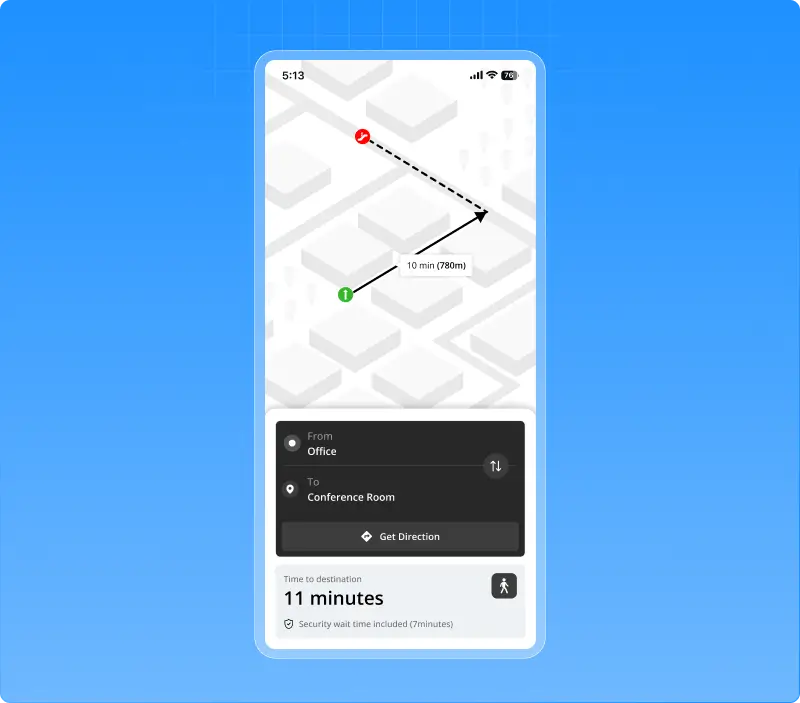
A new wayfinding module introduces turn-by-turn indoor navigation directly within Gridzee.
Users can select a source and destination and instantly receive:
- Route visualization on the indoor map
- Turn-by-turn navigation instructions
- Distance and estimated travel duration
- Floor-by-floor navigation guidance
- Elevator, escalator, and stair transition information
- Building and floor context throughout the journey
The system automatically calculates the optimal route and visually guides users across single-floor or multi-floor environments.
What this enables
- Navigate complex indoor spaces with confidence
- Find the shortest path between locations
- Guide visitors, employees, and contractors more effectively
- Simplify movement across multiple floors and buildings
- Share routes instantly using generated navigation links
Why this matters
- Reduces time spent searching for destinations
- Improves visitor and employee experience
- Enhances navigation in large and complex facilities
- Supports smoother movement across multi-floor environments
- Turns indoor maps into an actionable navigation tool
Now, users don’t just see where a location they know exactly how to get there.
3.2 Manage gateways directly from live tracking
When monitoring indoor operations, users often identify changes that need to be made to gateways in real time.
Earlier, updating gateway details or rearranging gateway placements required navigating away from Live Tracking and accessing separate configuration screens. This interrupted workflows and made simple updates more time-consuming than they needed to be.
Now, gateway management can happen right where users are already working.
What’s changed
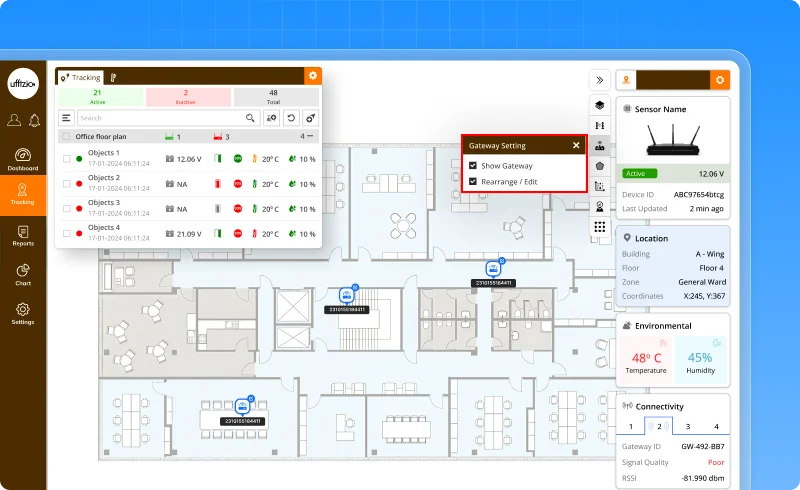
A new gateway edit mode has been introduced within live tracking.
Using a dedicated toggle option, users can:
- Enter Gateway Insert/Edit mode directly from live tracking
- Rearrange gateway placements on the map
- Update gateway names
- Modify gateway brand and model information
- Instantly refresh the layout after changes are saved
This creates a more seamless experience for managing indoor infrastructure without leaving the operational view.
What this enables
- Manage gateways directly from the Live Tracking screen
- Rearrange gateway layouts with fewer steps
- Update gateway information in real time
- Reduce dependency on separate configuration workflows
- Keep indoor layouts accurate and up to date
Why this matters
- Improves operational efficiency for administrators
- Simplifies indoor infrastructure management
- Reduces time spent switching between screens
- Helps maintain accurate gateway configurations as environments evolve
- Creates a more intuitive and user-friendly management experience
Now, users can monitor and manage gateway infrastructure from a single screen making indoor operations faster, simpler, and more efficient.
Conclusion
Every enhancement released this month is driven by a single goal: helping organizations make better decisions with less effort. Whether through smarter automation, deeper operational insights, stronger compliance controls, or improved user experiences, these updates are designed to create measurable value across daily operations.
We’re excited to continue building solutions that adapt to your evolving needs and look forward to sharing more innovations in the months ahead.