Join Uffizio at : SECUREX EXPO 2026 | Johannesburg, SA | 02 - 04 June 2026 Register Now
00 DAYS
:
00 HRS
:
00 MIN
:
00 SEC

Job Management

Manage jobs, assign tasks faster, and improve operational efficiency with a centralized job management system. Plan schedules, monitor job progress in real time, and optimize resource allocation from one platform.

Spotlight

Highlights of
job management

Managing field jobs manually can lead to delays, missed assignments, poor resource utilization, and limited operational visibility. Our job management system helps businesses streamline job allocation, monitor task progress, and improve workforce efficiency with real-time operational insights.

Smart job scheduling

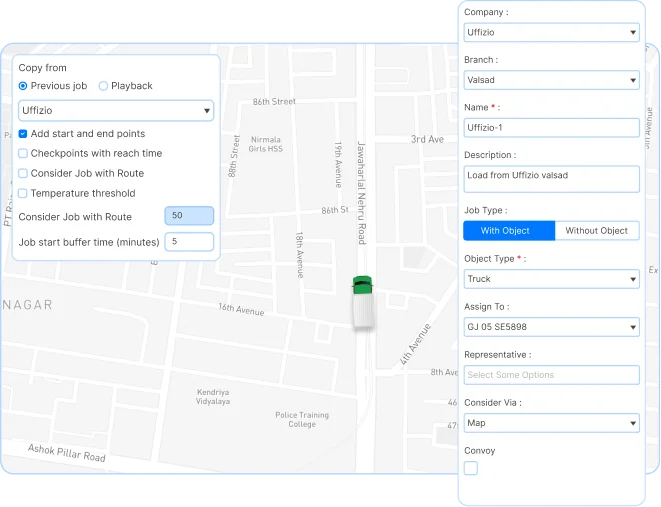
Plan and assign jobs more efficiently with flexible scheduling tools. The system helps businesses allocate jobs quickly and improve task completion across daily operations.

Your clients can manage recurring jobs, fixed schedules, and urgent assignments from one centralized platform.

  • Flexible job scheduling
  • Fixed and recurring schedules
  • Automatic job allocation
  • Faster task assignment
  • Better workforce planning
  • Reduced scheduling delays

Real-time job tracking

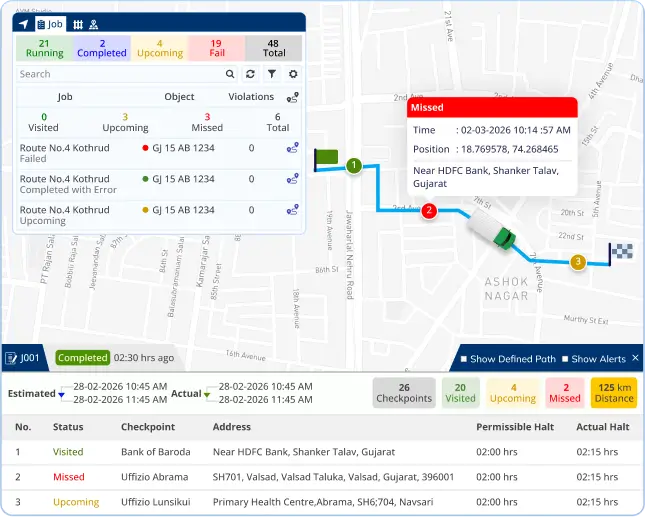
Monitor job activity and workforce progress in real time from one centralized dashboard. The platform helps businesses identify delays quickly and improve operational response during ongoing tasks.

Live Job Visibility
Track ongoing jobs, assigned drivers, and task progress continuously.

Critical Alert Notifications
Receive alerts for delayed jobs, missed checkpoints, and operational exceptions.

Better Operational Coordination
Improve communication and reduce operational delays with live monitoring visibility.

Multiple checkpoint allocation

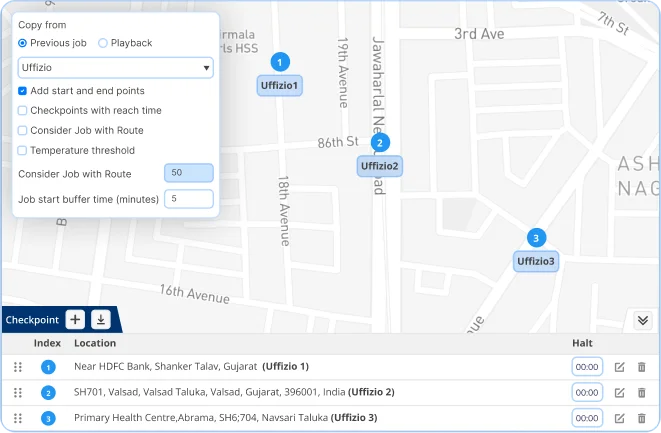
Manage jobs with multiple stops and checkpoints more efficiently. The system helps businesses monitor task completion across routes and maintain better coordination during operations.

Assign multiple checkpoints
Create jobs with multiple checkpoints and manage stop-wise task execution.

Real-time progress monitoring
Track driver movement and job progress at each checkpoint in real time.

Route adherence monitoring
Ensure tasks are completed according to planned checkpoints and schedules.

Our Fleet Management
Software Successfully supports

0 +
Countries

Lorem Ipsum is simply dummy text.

0 K +
Happy Customers

Lorem Ipsum is simply dummy text.

0 +
Supported Trackers

Lorem Ipsum is simply dummy text.

Features

Expand your knowledge on
job management system

Manage field operations more efficiently with smarter scheduling, real-time tracking, and workforce monitoring tools.

Smart Job Scheduling
Plan and assign jobs using fixed, recurring, or automatic scheduling methods.
Automatic Job Allocation
Assign tasks automatically based on operational requirements and driver availability.
Multi-Checkpoint Job Planning
Create jobs with multiple checkpoints and manage stop-wise execution easily.
Real-Time Job Tracking
Monitor ongoing jobs, assigned drivers, and task completion in real time.
Live Workforce Visibility
Track field activity and operational progress from one centralized dashboard.
Critical Alert Notifications
Receive alerts for delayed tasks, missed checkpoints, and operational issues.
AI-Based Operational Insights
Analyze task trends, operational delays, and workforce performance using AI-powered insights.
Detailed Job Reports
Access job summaries, task reports, and operational performance insights.
Resource Utilization Monitoring
Monitor workforce and vehicle allocation to improve operational efficiency.
Ebook

Explore the complete guide to job management

Download our ebook to learn how businesses improve task allocation, monitor field operations, reduce delays, and manage workforce activity more efficiently using a smart job management system.

Questions

Frequently asked Questions

Frequently asked Questions

What exactly is Uffizio's job management?

Uffizio’s job management system offers a centralized platform for dispatching work orders, assigning tasks, and tracking their progress in real-time.
Furthermore, the job management features encompass creating and assigning new jobs, scheduling recurring tasks, optimizing routes. This certainly saves time and fuel costs, and generating automated reports to keep track of job history and performance.

What kind of alerts can be generated for a particular job?

Uffizio’s job module provides a flexible and customizable solution for generating alerts and notifications. Moreover, it allows businesses to stay on top of their field service operations and improve overall efficiency.
Alerts like job status, job route deviation, unauthorized halt and many other alerts are provided significantly by the software.

Can we optimize a particular job? For eg: the most cost & time effective route to complete a job?

Yes, Uffizio’s job module allows businesses to optimize particular jobs by providing the most cost and time-effective route to complete a job. The software includes a route optimization feature that allows businesses to optimize the routes for their workers to travel between job locations.

Is there a possibility of customized scheduling of jobs?

Yes, Uffizio’s job module provides a range of scheduling options that can be customized to meet the specific needs of businesses. The software allows businesses to create custom job templates with specific scheduling requirements, such as start times, end times, and recurring schedules.
Using the scheduling features in the job module, businesses can schedule jobs based on worker availability, customer requirements, and other factors. Jobs can be scheduled to start and end at specific times, or to recur on a regular basis, such as daily, weekly, or monthly.

Can we know what is the cost of completing one job?

Yes, Uffizio’s job module provides a cost tracking feature that allows businesses to track the cost of completing each job. This feature can be useful for businesses that need to monitor job costs and profitability for their field service operations.
Using the cost tracking feature, businesses can track costs associated with each job, such as labor costs, equipment costs, and material costs. The software provides detailed reports on job costs, including the total cost of completing each job and the cost breakdown for each component of the job.

Can the entire job be customized as per our requirements?

Yes, Uffizio’s job module can be customized to meet the specific requirements of your business. The software allows for the creation of custom job templates, which can be tailored to your specific needs and requirements.
Using the job template feature, you can define the job details, such as job title, location, description, and also priority. You can also set up custom fields to capture additional information that is relevant to your business.
In addition, the job module allows for the creation of custom job statuses, which can be used to track the progress of each job. You can define your own job status labels, such as “scheduled,” “in progress,” or “completed,” and set up workflows to automatically update job status based on certain triggers, such as when a worker marks a job as complete.
Overall, Uffizio’s job module provides a flexible and customizable solution for managing your field service operations. It furthermore allows you to tailor the software to your specific needs and requirements.

What are the different types of reports you have for the job management?

Uffizio’s job management provides a variety of reports that can help businesses track their field service operations and analyze job performance. Some of the different types of reports available in the job module include:
Job status report: This report provides an overview of all jobs and their current status, including the number of jobs scheduled, in progress, and completed.
Detailed summary report: This report provides details on all jobs completed within a specific time frame, including the worker assigned to the job, the start and end times, and the job status.
Job detail report: This report provides insights into worker performance, including the number of jobs completed, time taken to complete each job, and any delays or issues encountered.
In addition to this we also provide object job summary, driver job summary, job fuel summary, job temperature summary report.

Are there any limitations to the number of checkpoints that can be added to a particular job?

Uffizio’s job module does not have any specific limitations on the number of checkpoints that can be added to a particular job. The software allows businesses to create custom job templates that include as many checkpoints as necessary to complete the job.

Is it possible to know the fuel usage in particular jobs?

Yes, Uffizio’s job module includes a fuel consumption tracking feature that allows businesses to track fuel usage for each job. This feature can be useful for businesses that need to monitor fuel consumption and costs for their field service operations.
Using the fuel consumption tracking feature, businesses can track fuel usage for each job based on factors such as the distance traveled, the type of vehicle used, and the job duration. The software provides detailed reports on fuel consumption, including the amount of fuel used, the cost of fuel, and the fuel economy for each job.

What does "Object Load State" mean in a particular job?

Object Load State refers to the load status of the vehicle that is associated with a particular job. This feature allows businesses to track the location and status of the vehicle as it moves through various stages of the job.
For example, if a job involves transporting goods or equipment from one location to another using a vehicle, the “Object Load State” feature can be used to track the vehicle as it moves through different stages of the job, such as loading, transit, and unloading. This can help businesses ensure that the vehicle is being used efficiently and safely, and can also provide visibility into the status of the job for both the business and the customer.

Let's Connect !

Loading...