We are always working to make our software smarter, faster, and easier for you to use. Each enhancement is designed to solve real challenges, improve daily operations, and give you more control over your work. These updates are based on feedback from our clients, ensuring the features you get are practical, user-friendly, and built to make your job simpler.
1. Trakzee Updates
1.1 New SMS gateway support: MTN CPaaS (POST API)
We’ve added support for a new type of SMS gateway — MTN CPaaS — using the POST API method.
What does this mean?
Some overseas clients need to use different SMS service providers. With this update, our system now supports the MTN CPaaS gateway so clients can send SMS through it for things like:
- Alertas
- OTPs
- Share location messages
What’s new:
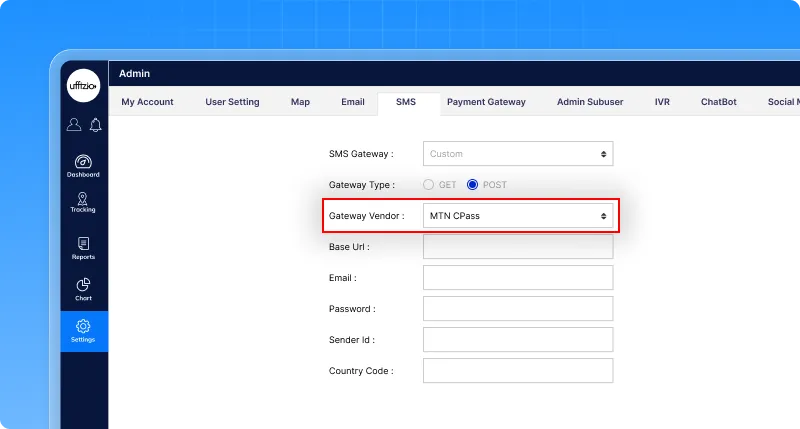
- In the SMS configuration screen, users can now choose between GET (default) or POST method
- When POST is selected, you can choose MTN CPaaS as the vendor
- The system will ask for basic details like Base URL, Email, and Password
- It works with all existing templates and SMS features
- Inherited settings still work for HTTP as before
This update gives clients more flexibility and makes it easier to connect with international SMS providers.
1.2 Print or download job playback reports
We’ve made it easier for users to save or share job completion details with a brand-new Print and Export to PDF option on the Job Playback screen. Whether you need to review route deviations, share trip details with a client, or just keep a clean report for records, you can now do it all in one click.
Here’s what you’ll get in the report:
- A map snapshot showing the actual route vs. missed/deviated paths
- Job summary with vehicle, driver, company, and branch details
- List of checkpoints and deviation points
- Total distance and time covered
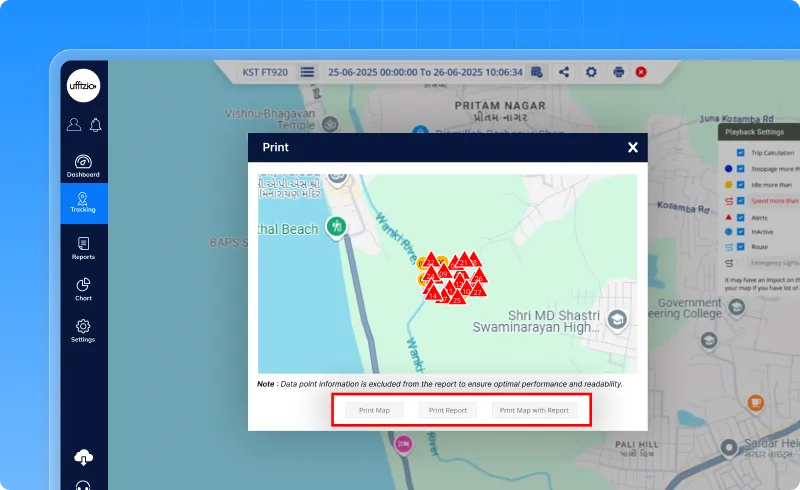
Just hit Print or Download PDF, and the system will generate a clean A4 report — ready to share or save, with everything laid out neatly. No backend setup needed. Just click and go.
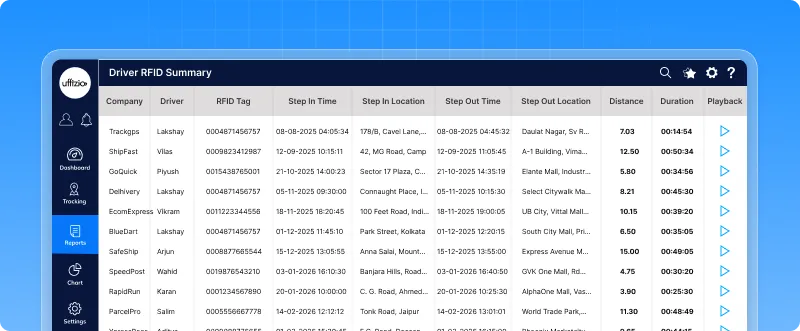
1.3 Accurate driver mapping for reused RFID/iButton/Beacon tags
We’ve improved how the system handles RFID, iButton, and Beacon tags assigned to drivers so your clients never lose track of who was driving what and when.
What’s the change?
Until now, when a tag was reassigned to a new driver, the system overwrote the past association, making it hard to track who used the tag earlier.
With this update:
- The system now remembers which driver used the tag during which period
- Historical reports stay accurate, even if the same tag is reused later
- Reports and live tracking screens now show the correct driver based on tag usage time
- You can safely reassign tags without losing any past driver date
This is especially useful for clients who reuse RFID tags but need clear, audit-friendly driver logs and accurate reporting for compliance.
1.4 Send commands faster with new command templates
Tired of typing GPS commands every time? We’ve got you covered. With the new Commands Master, you can now create and manage command templates that are ready to use, saving time and reducing errors.
- Create and save custom commands — generic or device-specific
- Select a predefined template while sending a command, and it fills in the message automatically
- Send commands to individual vehicles or groups
- All changes are available on both the web and the mobile app
- Permissions ensure users only see or manage commands relevant to them
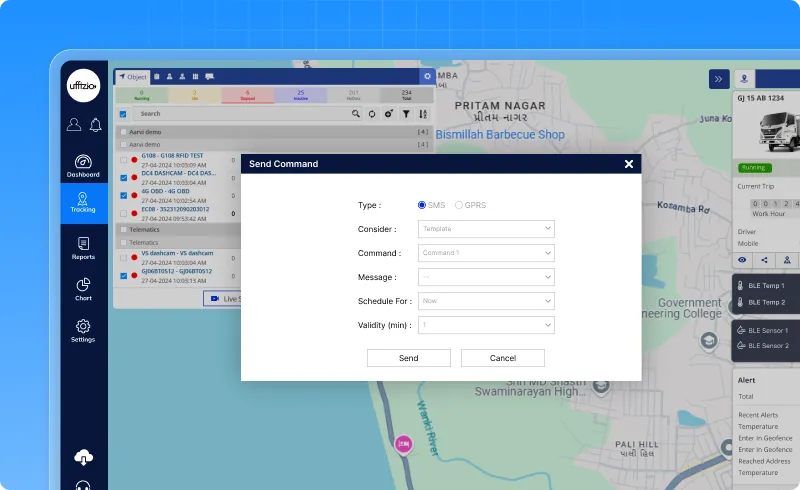
Whether you’re sending an ignition off command, a reset, or any custom instruction — now it’s just select, review, and send. This update makes the whole process faster, safer, and much more user-friendly for system integrators and fleet managers.
1.5 New sensor support: track drum rotation in real time
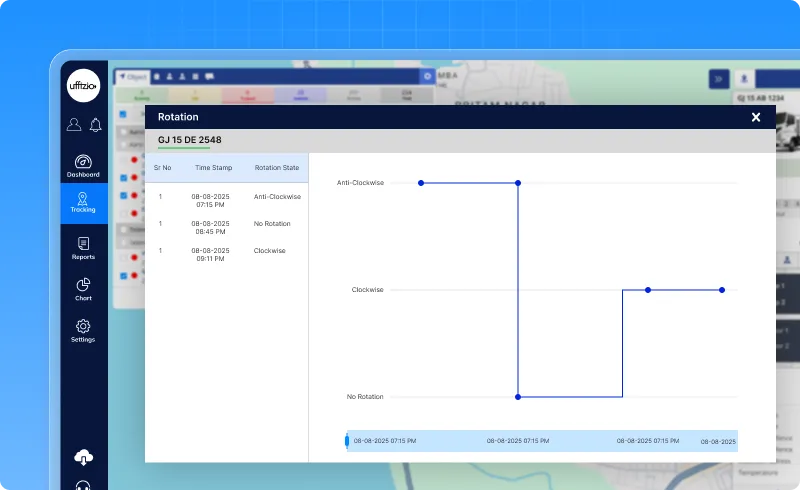
We’ve added a new sensor that helps track the direction of cement truck drums in real-time. Now, you can easily see if the drum is mixing (clockwise), discharging (anti-clockwise), or idle (no rotation).
- Real-time data shows if the drum is rotating or idle
- A widget on the Live Tracking screen displays the direction and time of rotation
- 24-hour graphs show the drum’s activity over the day
- Informes now include rotation details like direction, distance, and duration1.6
This feature makes it easier to monitor drum activity, improve efficiency, and ensure accurate reporting.
1.6 Search vehicles by driver name in live tracking
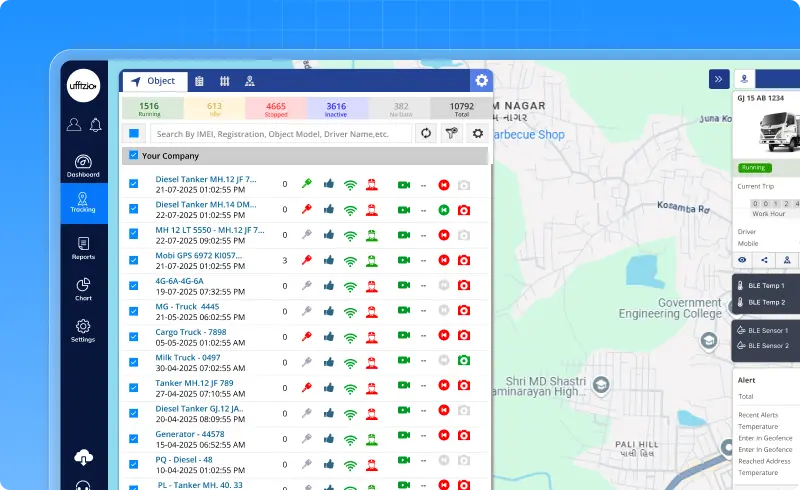
You can now search for vehicles in the Live Tracking screen using the Driver’s Name. Until now, users could only search using IMEI, registration number, SIM number, or object model. But in many cases, users only remember the driver’s name. This enhancement makes it easier and faster to find vehicles based on who is driving them.
How it works
- You can type the full driver name to find the vehicle.
- Even partial names work (e.g., typing “John” will show all matching drivers).
- The search is not case-sensitive.
- If the vehicle has no driver assigned, it won’t appear in driver name searches.
- You can use driver name along with other filters too.
Makes daily tracking tasks simpler by helping users quickly find vehicles using the name of the assigned driver.
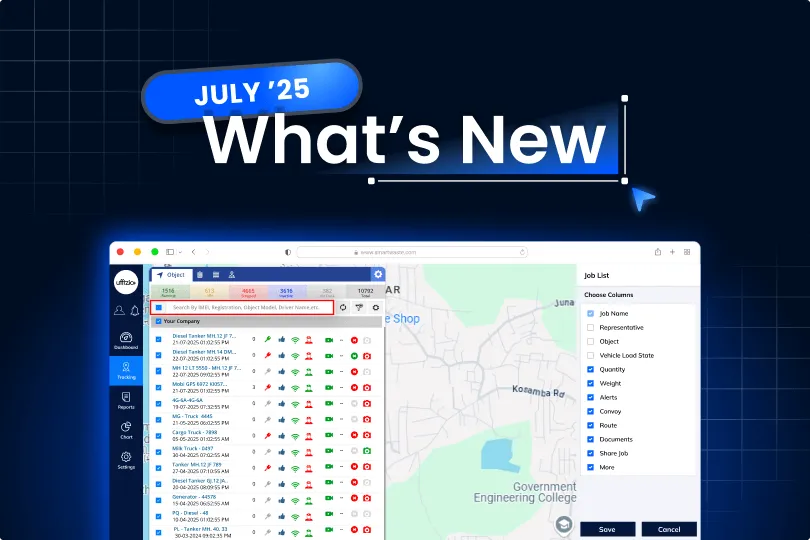
1.7 Customizable job column visibility in live tracking
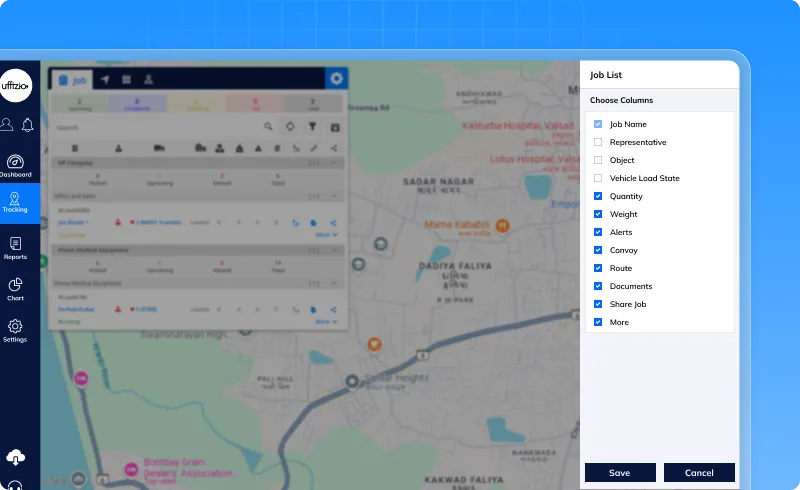
We’ve added a new Settings option inside the Job tab on the Live Tracking screen. Users can now show or hide specific job columns like:
- Representative
- Object State
- Quantity
- Weight
- Violation
- Convoy
- Route
- Documents
- Share
The ⚙️ Settings button opens a side panel with checkboxes. You can turn columns ON or OFF with a simple click. Your selection is saved automatically, per user. Preferences will remain the same even after logout or refresh.
Why it matters:
- Cleaner, personalized view
- Focus only on relevant job details
- Saves time by reducing clutter
2. Smartwaste Updates
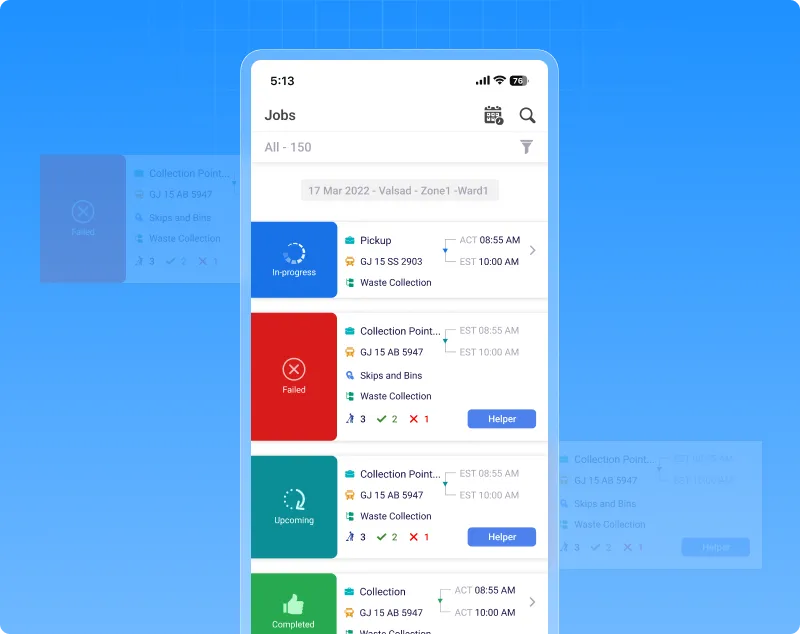
2.1 Collector app now shows failed jobs for better visibility
We’ve added a new ability to track failed jobs in the Collector App — so nothing gets missed, even when things don’t go as planned.
What’s added?
- If a job fails or doesn’t complete, it will now appear with a ‘Failed’ status.
- Puedes verlo directamente en la aplicación Collector, al igual que los trabajos completados.
- Esto ayuda a los usuarios y supervisores. saber exactamente qué pasó — y tomar medidas si fuera necesario.
Por qué es útil:
A veces, un trabajo puede no completarse debido a problemas de red u otras razones. Con esta actualización, usted no se perderá el seguimiento de ningún trabajo —con éxito o sin él.La aplicación Collector ahora muestra mejor La imagen completa del trabajo diario — sencillo, claro y completo.
2.2 Selección automática de puntos de control clave en las rutas de recogida de residuos
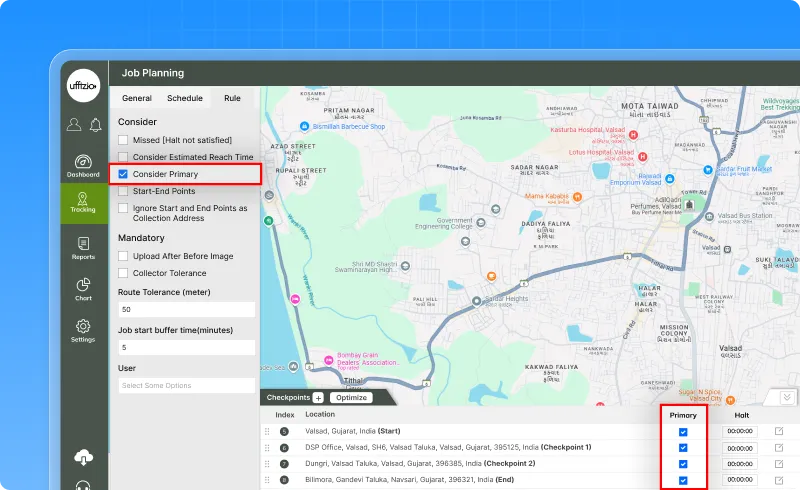
Planificar las rutas de recogida de residuos ahora es más fácil. Ahora puede decidir qué paradas de una ruta deben marcarse como importante (primario) — no solo la primera y la última. Simplemente ingrese un número (como 5) y el sistema marcará cada quinta parada como una Punto de control principal.
For example:
Si hay 20 paradas y usted introduce 5, la 1.ª, la 5.ª, la 10.ª, la 15.ª y la 20.ª se marcarán como importantes.
- Ayuda a un mejor seguimiento de la ruta.
- Facilita que los equipos se centren en ubicaciones clave.
- Ahorra tiempo durante la planificación del trabajo.
¡Sin pasos adicionales! Solo tienes que introducir un número y el sistema se encarga del resto.
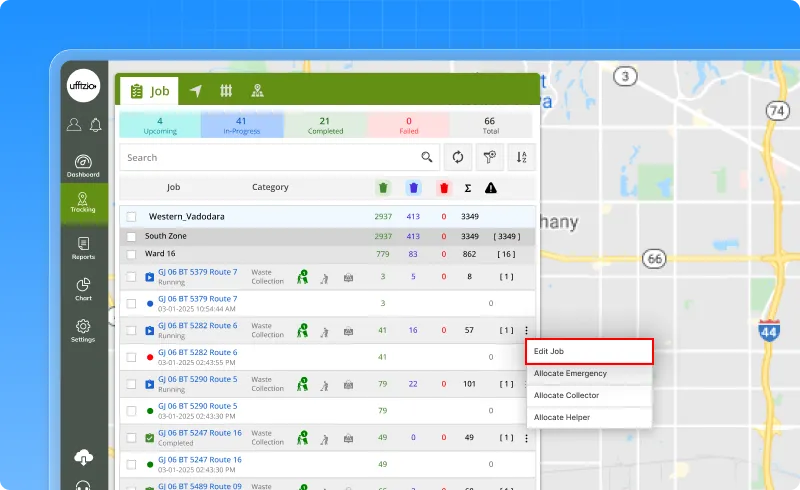
2.3 Opción “Editar trabajo” para los próximos trabajos en el seguimiento en tiempo real
Hemos añadido una nueva función que permite a los usuarios editar los próximos trabajos directamente desde la pantalla de Seguimiento en directo, sin necesidad de ir a otra página.
¿Por qué era necesario esto?
En ocasiones, los usuarios necesitan cambiar el vehículo asignado antes de que comience un trabajo. Puede que un vehículo no esté disponible o que otro sea más adecuado. Esta nueva opción permite a los usuarios realizar esos cambios rápidamente desde donde supervisan los trabajos en tiempo real.
Notas importantes:
- Si el trabajo ya ha comenzado, recibirás un mensaje:
“Este trabajo ya no se puede editar porque no está en estado de Próximo.” - Los cambios se registran con fines de auditoría.
- Los datos de los empleos se actualizarán en tiempo real y los registros anteriores permanecerán sin cambios.
Por qué es útil:
Esto hace que la planificación del trabajo sea más rápida y flexible, y ayuda a evitar retrasos cuando las cosas cambian a última hora.